チャット · チャットUI
流れて出るAIアシスタントのチャット画面
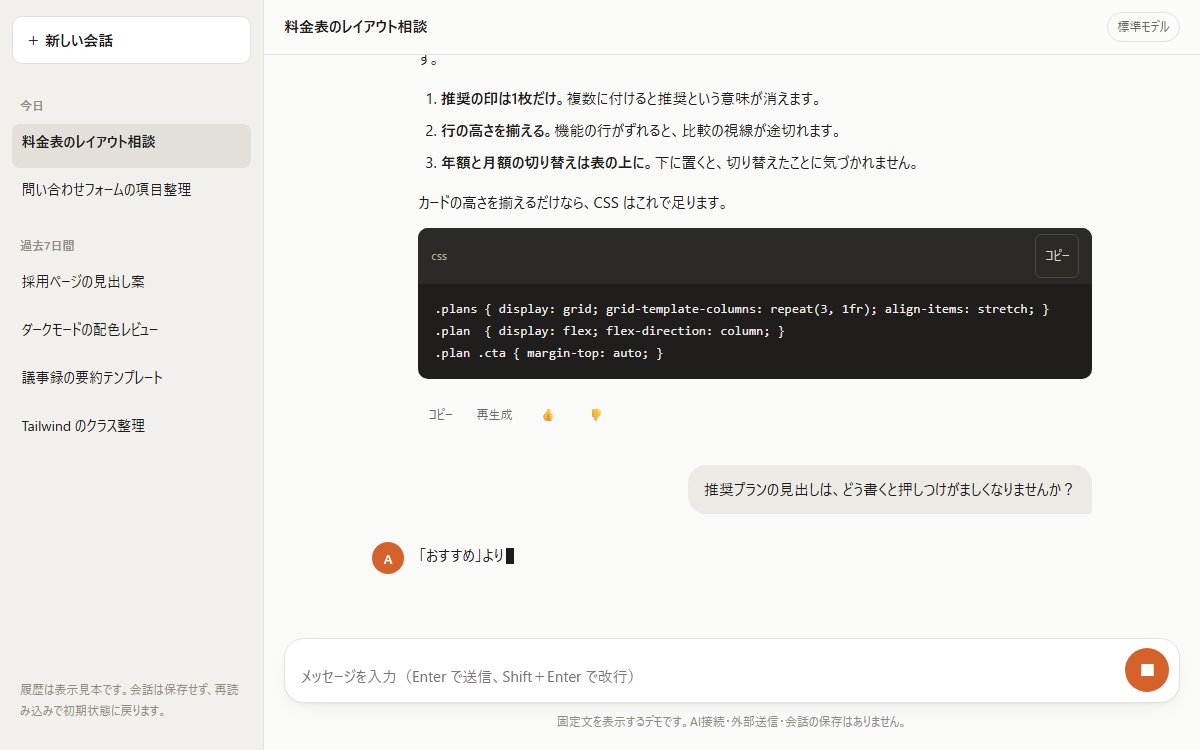
左に会話の履歴、中央に質問と回答を並べるAIアシスタント型のチャット画面。回答が一文字ずつ流れて出る表示、生成の停止、コードのコピー、日本語入力の変換確定で誤送信しない入力欄までを1枚で再現する。
このブラウザー内に保存します。別の端末との同期はなく、サイトデータを消すと保存も消えます。
印刷時は見本を静止画にし、プロンプトと解説を出力します。PDF保存はブラウザーの印刷画面から選べます。
Vibehaus · デザイン資料
https://vibe.itlibra.com/design/ai-assistant-chat/
完全無料・著作権フリー(CC0)· 料金¥0 · 商用利用・改変自由
プレビュー
指定幅で実際に組み替えて表示します。表示領域より広い場合は、この枠の中で横へスクロールできます。
AIへの指示文
AIアシスタントのチャット画面を作ってください。ChatGPT のような、質問と回答を1列に並べる形です。

要件:
- 配色: 地は温かみのある白 #fafaf8、履歴欄 #f1f0ec、文字 #1d1c1a、補助文字 #6b6860、アクセントは焦げ橙 #d4622a。
- 左に幅264pxの履歴欄(新しい会話ボタン、「今日」「過去7日間」の見出しで区切った会話タイトル一覧、選択中は背景を濃く)。
- 中央は最大幅720pxの1列。利用者の発言は右寄せの灰色の吹き出し、回答は吹き出しを使わず左にアイコンを置いて全幅で組む。
- 回答には番号付きリスト、太字、インラインコード、言語名とコピーボタン付きのコードブロックを含める。
- 回答の下にコピー・再生成・高評価・低評価のボタンを小さく並べる。
- 最後の回答は、開いた時点で一文字ずつ流れて表示されるようにし、末尾に点滅する四角いカーソルを付ける。生成中は送信ボタンを「停止」に切り替える。
- 入力欄は画面下に固定。複数行に合わせて高さが伸び、上限200px。Enter で送信、Shift+Enter で改行。
- 日本語入力の変換を確定する Enter では送信しない(KeyboardEvent.isComposing が true、または keyCode が 229 のときは無視)。
- 新しい回答が流れてきても、利用者が上を読み返している間は自動でスクロールしない。下端付近にいるときだけ追従する。
- 会話の領域は role="log" と aria-live="polite"。生成中は aria-busy="true" にして、途中の文字を読み上げさせない。
- prefers-reduced-motion のときは流す演出をやめ、全文を一度に表示する。
- 幅760px未満では履歴欄を隠し、ヘッダーのボタンで横から出す。
- フォント: Inter と日本語の system フォント。コードは JetBrains Mono。
バリエーション
ダーク版
地を #17161a、履歴欄を #1f1e22、利用者の吹き出しを #2a2930 に。
アクセントは #e8875a に上げて、暗い地でも沈まないようにする。
社内ナレッジ検索版
回答の末尾に「参照した文書」として社内文書のカードを3枚並べる。
カードには文書名・更新日・該当箇所の抜粋を表示し、回答中の該当文に番号の上付きリンクを付ける。
このプレビューのコード
HTML・CSS・JavaScriptの1ファイルです。外部依存・広告・解析コードはありません。用意した文章を流して表示するデモです。AI接続・外部送信・会話の永続保存はありません。停止・ページ内の新しい会話・コードコピーを試せます。履歴や評価は表示見本です。
コードを表示
<!doctype html>
<!-- Vibehaus — CC0。外部依存なし。固定文を表示するデモで、AI接続・送信・保存は行わない。 -->
<html lang="ja">
  <head>
    <meta charset="utf-8" />
    <meta name="viewport" content="width=device-width, initial-scale=1" />
    <meta name="robots" content="noindex" />
    <title>流れて出るAIアシスタントのチャット画面 — Vibehaus プレビュー</title>
    <style>
      :root {
        --bg: #fafaf8;
        --side: #f1f0ec;
        --panel: #ffffff;
        --line: #e4e2dc;
        --ink: #1d1c1a;
        --muted: #6b6860;
        --quiet: #8f8b82;
        --user: #eceae4;
        --accent: #d4622a;
        --accent-ink: #ffffff;
        --code: #1f1e1c;
        --code-ink: #efece6;
        --radius: 14px;
        --font: "Inter", system-ui, -apple-system, "Hiragino Sans", "Hiragino Kaku Gothic ProN",
          "Yu Gothic Medium", "Yu Gothic", "Meiryo", sans-serif;
        --mono: "JetBrains Mono", ui-monospace, "SFMono-Regular", Menlo, Consolas, monospace;
      }
      * { box-sizing: border-box; }
      html, body { height: 100%; }
      body {
        margin: 0;
        font-family: var(--font);
        font-size: 15px;
        line-height: 1.8;
        letter-spacing: 0;
        color: var(--ink);
        background: var(--bg);
      }
      button, textarea { font: inherit; color: inherit; }
      button { cursor: pointer; }
      .app { display: grid; grid-template-columns: 264px minmax(0, 1fr); height: 100%; }

      /* ---------- 履歴 ---------- */
      .side {
        display: flex;
        flex-direction: column;
        gap: 0.25rem;
        padding: 1rem 0.75rem;
        background: var(--side);
        border-right: 1px solid var(--line);
        overflow-y: auto;
      }
      .new {
        display: flex;
        align-items: center;
        gap: 0.5rem;
        margin-bottom: 0.75rem;
        padding: 0.6rem 0.8rem;
        font-weight: 600;
        background: var(--panel);
        border: 1px solid var(--line);
        border-radius: 10px;
      }
      .new:hover { border-color: var(--quiet); }
      .group { margin: 0.9rem 0.5rem 0.25rem; font-size: 12px; font-weight: 600; color: var(--quiet); }
      .hist {
        display: block;
        padding: 0.45rem 0.6rem;
        font-size: 14px;
        line-height: 1.6;
        color: var(--ink);
        text-decoration: none;
        border-radius: 8px;
        white-space: nowrap;
        overflow: hidden;
        text-overflow: ellipsis;
      }
      .hist:hover { background: #e7e5df; }
      .hist[aria-current="page"] { background: #e2e0d9; font-weight: 600; }
      .side-foot { margin-top: auto; padding: 0.75rem 0.5rem 0; font-size: 12px; color: var(--quiet); }

      /* ---------- 会話 ---------- */
      .main { display: flex; flex-direction: column; min-width: 0; height: 100%; }
      .top {
        display: flex;
        align-items: center;
        gap: 0.75rem;
        padding: 0.75rem 1.25rem;
        border-bottom: 1px solid var(--line);
        background: color-mix(in srgb, var(--bg) 88%, transparent);
      }
      .top h1 { margin: 0; font-size: 15px; font-weight: 600; line-height: 1.4; }
      .model {
        margin-left: auto;
        padding: 0.2rem 0.6rem;
        font-size: 12px;
        color: var(--muted);
        border: 1px solid var(--line);
        border-radius: 999px;
      }
      .menu { display: none; padding: 0.3rem 0.55rem; background: none; border: 1px solid var(--line); border-radius: 8px; }

      .log { flex: 1; overflow-y: auto; padding: 2rem 1.25rem 1rem; }
      .col { max-width: 720px; margin: 0 auto; }
      .msg { margin: 0 0 1.75rem; }
      .msg.user { display: flex; justify-content: flex-end; }
      .msg.user .bubble {
        max-width: 80%;
        padding: 0.7rem 1rem;
        background: var(--user);
        border-radius: 18px 18px 4px 18px;
      }
      .msg.ai { display: grid; grid-template-columns: 32px minmax(0, 1fr); gap: 0.9rem; }
      .avatar {
        display: grid;
        place-items: center;
        width: 32px;
        height: 32px;
        font-size: 13px;
        font-weight: 700;
        color: var(--accent-ink);
        background: var(--accent);
        border-radius: 50%;
      }
      .body p { margin: 0 0 0.8rem; }
      .body ol { margin: 0 0 0.8rem; padding-left: 1.4rem; }
      .body li + li { margin-top: 0.3rem; }
      .body strong { font-weight: 700; }
      .body code {
        padding: 0.1em 0.35em;
        font-family: var(--mono);
        font-size: 0.88em;
        background: #eeece6;
        border-radius: 4px;
      }
      .codeblock { margin: 0 0 0.9rem; overflow: hidden; background: var(--code); border-radius: 10px; }
      .codebar {
        display: flex;
        justify-content: space-between;
        align-items: center;
        padding: 0.35rem 0.8rem;
        font-size: 12px;
        color: #b8b3a8;
        background: #2b2a27;
      }
      .codebar button { padding: 0.1rem 0.5rem; font-size: 12px; color: #d8d4cb; background: none; border: 1px solid #4a4843; border-radius: 6px; }
      /* 本文中のインラインコードの地色を、ブロックの中まで持ち込まない */
      .codeblock code { padding: 0; font-size: inherit; color: inherit; background: none; border-radius: 0; }
      .codeblock pre { margin: 0; padding: 0.9rem 1rem; overflow-x: auto; font-family: var(--mono); font-size: 13px; line-height: 1.7; color: var(--code-ink); }
      .actions { display: flex; gap: 0.25rem; margin-top: 0.2rem; }
      .actions button {
        padding: 0.25rem 0.55rem;
        font-size: 12px;
        color: var(--muted);
        background: none;
        border: 1px solid transparent;
        border-radius: 6px;
      }
      .actions button:hover { border-color: var(--line); color: var(--ink); }

      /* 生成中の目印。文字の後ろに置く四角いカーソル */
      .caret {
        display: inline-block;
        width: 0.55em;
        height: 1.05em;
        margin-left: 2px;
        vertical-align: -0.15em;
        background: var(--ink);
        animation: blink 1s steps(1) infinite;
      }
      @keyframes blink { 50% { opacity: 0; } }

      /* ---------- 入力 ---------- */
      .composer { padding: 0.75rem 1.25rem 1.1rem; background: var(--bg); }
      .suggest { display: flex; flex-wrap: wrap; gap: 0.5rem; margin-bottom: 0.7rem; }
      .chip {
        padding: 0.35rem 0.8rem;
        font-size: 13px;
        color: var(--muted);
        background: var(--panel);
        border: 1px solid var(--line);
        border-radius: 999px;
      }
      .chip:hover { color: var(--ink); border-color: var(--quiet); }
      .box {
        display: flex;
        align-items: flex-end;
        gap: 0.5rem;
        padding: 0.6rem 0.6rem 0.6rem 1rem;
        background: var(--panel);
        border: 1px solid var(--line);
        border-radius: 20px;
        box-shadow: 0 1px 2px rgba(0, 0, 0, 0.04), 0 8px 24px -12px rgba(0, 0, 0, 0.12);
      }
      .box:focus-within { border-color: var(--quiet); }
      textarea {
        flex: 1;
        min-height: 28px;
        max-height: 200px;
        padding: 0.2rem 0;
        line-height: 1.7;
        border: 0;
        outline: 0;
        resize: none;
        background: none;
      }
      .send {
        display: grid;
        place-items: center;
        flex: none;
        width: 36px;
        height: 36px;
        font-size: 16px;
        color: var(--accent-ink);
        background: var(--ink);
        border: 0;
        border-radius: 50%;
      }
      .send:disabled { opacity: 0.3; cursor: default; }
      .send[data-state="stop"] { background: var(--accent); }
      .hint { margin: 0.5rem 0 0; font-size: 12px; color: var(--quiet); text-align: center; }
      .sr { position: absolute; width: 1px; height: 1px; overflow: hidden; clip: rect(0 0 0 0); white-space: nowrap; }
      :focus-visible { outline: 2px solid var(--accent); outline-offset: 2px; }

      @media (max-width: 760px) {
        .app { grid-template-columns: minmax(0, 1fr); }
        .side { position: fixed; inset: 0 auto 0 0; z-index: 10; width: 264px; transform: translateX(-100%); transition: transform 0.2s; }
        .side.open { transform: none; box-shadow: 0 0 0 100vmax rgba(0, 0, 0, 0.3); }
        .menu { display: block; }
        .msg.user .bubble { max-width: 90%; }
      }
      @media (prefers-reduced-motion: reduce) {
        .caret { animation: none; }
        .side { transition: none; }
      }
      [hidden] { display:none !important; }
      button { min-width:44px; min-height:44px; }
      .hist { min-height:44px; white-space:normal; }
      .send { width:44px; height:44px; }
      .box textarea { min-width:0; overflow-wrap:anywhere; }
      .bubble,.body { min-width:0; overflow-wrap:anywhere; }
      .codeblock pre { white-space:pre-wrap; overflow-wrap:anywhere; }
      .model { flex-shrink:0; }
      .copy-status { margin:0; font-size:12px; line-height:1.8; color:var(--muted); }
      .app { grid-template-rows:minmax(0,1fr); }
      .main,.log { min-height:0; }
      .history-close { display:none; }
      @media (max-width:760px) { .side:not(.open) { visibility:hidden; } .history-close { display:block; } }
    </style>
  </head>
  <body>
    <div class="app">
      <nav class="side" id="side" aria-label="会話の履歴">
        <button type="button" class="history-close">履歴を閉じる ×</button>
        <button class="new" type="button">+ 新しい会話</button>
        <p class="group">今日</p>
        <a class="hist" href="#" aria-current="page">料金表のレイアウト相談</a>
        <a class="hist" href="#">問い合わせフォームの項目整理</a>
        <p class="group">過去7日間</p>
        <a class="hist" href="#">採用ページの見出し案</a>
        <a class="hist" href="#">ダークモードの配色レビュー</a>
        <a class="hist" href="#">議事録の要約テンプレート</a>
        <a class="hist" href="#">Tailwind のクラス整理</a>
        <p class="side-foot">履歴は表示見本です。会話は保存せず、再読み込みで初期状態に戻ります。</p>
      </nav>

      <main class="main">
        <header class="top">
          <button class="menu" type="button" aria-controls="side" aria-expanded="false">☰<span class="sr">履歴を開く</span></button>
          <h1>料金表のレイアウト相談</h1>
          <span class="model">標準モデル</span>
        </header>

        <div class="log" id="log" role="log" aria-live="polite" aria-label="会話">
          <div class="col" id="col">
            <div class="msg user">
              <div class="bubble">SaaS の料金表を3プランで作りたいです。真ん中を選ばせたいとき、何を気をつければいいですか?</div>
            </div>

            <div class="msg ai">
              <div class="avatar" aria-hidden="true">A</div>
              <div class="body">
                <p>真ん中のプランを選ばせるときに効くのは、<strong>比較のしやすさを崩さずに、1枚だけ目立たせる</strong>ことです。要点は3つあります。</p>
                <ol>
                  <li><strong>推奨の印は1枚だけ。</strong>複数に付けると推奨という意味が消えます。</li>
                  <li><strong>行の高さを揃える。</strong>機能の行がずれると、比較の視線が途切れます。</li>
                  <li><strong>年額と月額の切り替えは表の上に。</strong>下に置くと、切り替えたことに気づかれません。</li>
                </ol>
                <p>カードの高さを揃えるだけなら、CSS はこれで足ります。</p>
                <div class="codeblock">
                  <div class="codebar"><span>css</span><button type="button" data-copy>コピー</button></div>
                  <pre><code>.plans { display: grid; grid-template-columns: repeat(3, 1fr); align-items: stretch; }
.plan  { display: flex; flex-direction: column; }
.plan .cta { margin-top: auto; }</code></pre>
                </div>
                <div class="actions">
                  <button type="button" data-copy>コピー</button>
                  <button type="button">再生成</button>
                  <button type="button" aria-label="役に立った">👍</button>
                  <button type="button" aria-label="役に立たなかった">👎</button>
                </div>
              </div>
            </div>

            <div class="msg user">
              <div class="bubble">推奨プランの見出しは、どう書くと押しつけがましくなりませんか?</div>
            </div>
          </div>
        </div>

        <div class="composer">
          <div class="suggest" id="suggest" hidden>
            <button class="chip" type="button">比較表の行の順番は?</button>
            <button class="chip" type="button">無料プランは置くべき?</button>
            <button class="chip" type="button">スマホではどう並べる?</button>
          </div>
          <form class="box" id="form">
            <label class="sr" for="input">メッセージ</label>
            <textarea id="input" rows="1" placeholder="メッセージを入力(Enter で送信、Shift+Enter で改行)"></textarea>
            <button class="send" id="send" type="submit" aria-label="送信" disabled>↑</button>
          </form>
          <p class="hint">固定文を表示するデモです。AI接続・外部送信・会話の保存はありません。</p>
          <p class="copy-status" id="copy-status" role="status"></p>
        </div>
      </main>
    </div>

    <script>
      const log = document.getElementById("log");
      const col = document.getElementById("col");
      const form = document.getElementById("form");
      const input = document.getElementById("input");
      const send = document.getElementById("send");
      const suggest = document.getElementById("suggest");
      const reduce = matchMedia("(prefers-reduced-motion: reduce)").matches;

      const REPLIES = [
        "「おすすめ」より「いちばん選ばれています」のように、事実として書くと押しつけがましさが消えます。選んだ人の割合が出せるなら、それを添えるのがいちばん自然です。数字が無いなら「迷ったらこれ」くらいに留め、他の2枚を下げる言葉は使わないでください。",
        "比較表の行は、選ぶ理由になる順に上から並べます。価格の次に、プラン間で差がつく項目を置き、全プラン共通の項目は最後にまとめると、差分だけを追って読めます。",
      ];
      let turn = 0;
      let timer = null;
      let initial;

      // 下端付近にいるときだけ追従する。読み返している人を引き戻さない
      const nearBottom = () => log.scrollHeight - log.scrollTop - log.clientHeight < 80;
      const follow = (was) => { if (was) log.scrollTop = log.scrollHeight; };

      function addUser(text) {
        const m = document.createElement("div");
        m.className = "msg user";
        const b = document.createElement("div");
        b.className = "bubble";
        b.textContent = text;
        m.append(b);
        col.append(m);
        // 自分の送信は、どこを読んでいても必ず最下部へ連れて行く
        log.scrollTop = log.scrollHeight;
      }

      function stream(text) {
        const m = document.createElement("div");
        m.className = "msg ai";
        m.innerHTML = '<div class="avatar" aria-hidden="true">A</div><div class="body"><p></p></div>';
        col.append(m);
        const p = m.querySelector("p");
        const caret = document.createElement("span");
        caret.className = "caret";
        caret.setAttribute("aria-hidden", "true");

        // 生成中は読み上げを止め、終わってから全文を1回だけ伝える
        log.setAttribute("aria-busy", "true");
        setStreaming(true);

        if (reduce) {
          p.textContent = text;
          return done();
        }
        let i = 0;
        timer = setInterval(() => {
          const was = nearBottom();
          i = Math.min(text.length, i + 2);
          p.textContent = text.slice(0, i);
          p.append(caret);
          follow(was);
          if (i >= text.length) done();
        }, 28);

        function done() {
          clearInterval(timer);
          timer = null;
          caret.remove();
          log.setAttribute("aria-busy", "false");
          setStreaming(false);
          suggest.hidden = false;
        }
        stop = () => { p.textContent = p.textContent + "(中断しました)"; done(); };
      }
      let stop = () => {};

      function setStreaming(on) {
        send.dataset.state = on ? "stop" : "send";
        send.setAttribute("aria-label", on ? "生成を止める" : "送信");
        send.textContent = on ? "■" : "↑";
        send.disabled = on ? false : input.value.trim() === "";
      }

      function submit(text) {
        if (!text.trim()) return;
        clearTimeout(initial);
        addUser(text.trim());
        input.value = "";
        grow();
        suggest.hidden = true;
        stream(REPLIES[turn++ % REPLIES.length]);
      }

      function sendOrStop(e) {
        e.preventDefault();
        if (timer) return stop();
        submit(input.value);
      }
      form.addEventListener('submit', sendOrStop);
      // sandboxのallow-formsを広げず、クリックからページ内のデモだけを実行する。
      send.addEventListener('click', sendOrStop);

      // Enter で送信。ただし日本語入力の変換を確定する Enter では送らない。
      // isComposing が true の間、および keyCode 229(Safari の確定直後)は無視する
      input.addEventListener("keydown", (e) => {
        if (e.key !== "Enter" || e.shiftKey) return;
        if (e.isComposing || e.keyCode === 229) return;
        e.preventDefault();
        if (!timer) submit(input.value);
      });

      // 入力に合わせて高さを伸ばす(上限は CSS の max-height)
      function grow() {
        input.style.height = "auto";
        input.style.height = input.scrollHeight + "px";
        if (!timer) send.disabled = input.value.trim() === "";
      }
      input.addEventListener("input", grow);

      suggest.addEventListener("click", (e) => {
        const chip = e.target.closest(".chip");
        if (chip && !timer) submit(chip.textContent);
      });

      document.addEventListener("click", async (e) => {
        const btn = e.target.closest("[data-copy]");
        if (!btn) return;
        const src = btn.closest(".codeblock")?.querySelector("pre") ?? btn.closest(".body");
        const clone = src.cloneNode(true);
        clone.querySelectorAll('.actions,.codebar').forEach(node => node.remove());
        const value = src.matches('pre') ? src.textContent : clone.textContent.trim();
        const status = document.getElementById('copy-status');
        btn.disabled = true;
        try {
          if (!navigator.clipboard) throw new Error('unavailable');
          await navigator.clipboard.writeText(value);
          status.textContent = 'コピーしました。';
        } catch {
          status.textContent = 'コピーできませんでした。本文を選択しました。手動でコピーしてください。';
          src.tabIndex = -1; src.focus();
          const range = document.createRange(); range.selectNodeContents(src);
          const selection = getSelection(); selection.removeAllRanges(); selection.addRange(range);
        } finally { btn.disabled = false; }
      });

      const side = document.getElementById("side");
      const menu = document.querySelector(".menu");
      document.querySelector('.history-close').addEventListener('click', () => {
        side.classList.remove('open'); menu.setAttribute('aria-expanded','false'); menu.focus();
      });
      menu.addEventListener("click", () => {
        const open = side.classList.toggle("open");
        menu.setAttribute("aria-expanded", String(open));
      });
      document.addEventListener('keydown', event => {
        if (event.key === 'Escape' && side.classList.contains('open')) {
          side.classList.remove('open'); menu.setAttribute('aria-expanded','false'); menu.focus();
        }
      });
      document.querySelector('.new').addEventListener('click', () => {
        clearTimeout(initial);
        if (timer) stop();
        col.replaceChildren(); turn = 0; input.value = ''; grow(); suggest.hidden = false;
        document.querySelector('.top h1').textContent = '新しい会話';
        side.classList.remove('open'); menu.setAttribute('aria-expanded','false'); input.focus();
      });
      side.querySelectorAll('.hist').forEach(link => link.addEventListener('click', event => {
        event.preventDefault(); document.getElementById('copy-status').textContent = '履歴は表示見本です。過去の会話は保存していません。';
      }));
      document.querySelectorAll('.actions button:not([data-copy])').forEach(button => button.addEventListener('click', () => {
        document.getElementById('copy-status').textContent = '再生成・評価は表示見本です。外部への送信はありません。';
      }));

      // 最後の質問への応答を、開いた時点で流して見せる
      log.scrollTop = log.scrollHeight;
      initial = setTimeout(() => { if (!timer) stream(REPLIES[turn++ % REPLIES.length]); }, 500);
      window.addEventListener('pagehide', () => { clearTimeout(initial); clearInterval(timer); });
    </script>
  </body>
</html>
2026年10月14日、Chromiumで320・390・768・1280pxの描画とキーボードのフォーカス表示を確認しました。他のブラウザは未確認です。利用先のブラウザと実データでも確認してください。
概要
AIアシスタントのチャット画面は、2022年末の ChatGPT の公開から数か月で、事実上の標準形が決まりました。左に会話の履歴、中央に質問と回答の1列、下に固定の入力欄。後発の製品もほぼこの形をなぞっており、利用者はもうどこに打てば何が起きるかを学び直す必要がありません。
吹き出しを使うのは短い側だけ
メッセンジャーでは、発言はどちらも吹き出しに入ります。AIとの対話でこれをやると破綻します。回答は長く、番号付きの手順やコードを含むからです。
崩れる形回答も吹き出しに入れる
吹き出しの幅は画面の7〜8割に絞られるので、コードが横に切れて読めなくなります。左右に揺れる配置も、長文を追う視線を乱します。
効く形質問は吹き出し、回答は全幅
短い質問だけを右寄せの吹き出しにし、回答はアイコンの横に本文として全幅で組みます。読み物の組版に近づけるほど、長い回答が読みやすくなります。
流れて出る表示は待ち時間の設計
回答を一文字ずつ出すのは、生成に数秒かかることへの対処です。全文がそろうまで空白を見せるより、最初の数文字をすぐに出すほうが、待たされている感覚は小さくなります。生成中は送信ボタンを停止に切り替え、途中で止められるようにしておくこと。
ただし、流れてくる間に画面を引き戻すのは逆効果です。利用者が上を読み返しているときに自動で最下部へ飛ぶと、読んでいた場所を見失います。
自動スクロールは、下端付近にいるときだけ追従させる。読み返している人を引き戻さないことが、この画面でいちばん壊れやすい約束です。
仕上げの判断軸
入力欄の Enter 送信は、日本語では特に注意が要ります。変換を確定する Enter で送信されてしまう事故は、英語圏の実装をそのまま持ち込むと必ず起きます。isComposing と keyCode 229 の両方を見て、変換中の Enter を無視してください。
読み上げ環境では、生成中の文字が一文字ずつ読まれ続けます。会話の領域を aria-live にしたうえで、生成中は aria-busy で止め、終わってから全文を一度だけ伝える形にします。
チャットの構成要素
使いどころ
- 社内向けのAIアシスタントや問い合わせボット
- 自社プロダクトに組み込む対話型のヘルプ
- 生成AIを使ったSaaSの主画面
- 回答にコードや手順を含む開発者向けツール
このデザインの分類
背景と狙いどころ
よくある質問
回答を一文字ずつ流すのは演出にすぎない?
回答を吹き出しにしないのはなぜ?
Enter で送信するのは日本語だと危なくない?
この画面を実装する
動くサンプルとコピペできるコードを、技術別にまとめています。
関連するデザイン

選択肢で絞り込む右下のサポートチャット
Webサイトの右下に常駐する問い合わせ用のチャットウィジェット。用件を選択肢で絞り込む自動応答、営業時間に応じて約束を変える表示、時間外はメールで引き取る導線、閉じている間の未読数までを備える。

マンガの吹き出しで進むサポートチャット
太い輪郭線と尻尾付きの吹き出し、網掛けの紙地でサポート対話をマンガのコマとして見せるチャットUI。解決の瞬間だけ叫び吹き出しに切り替えて感情の起伏を作ります。

Discord/Slack風の3ペイン・チャット画面
Discord・Slack のチャットUIを再構築した3ペインインターフェイス。サーバーリスト+チャンネル+メッセージスレッド+リアクション・スレッドの定番構成を CSS だけで網羅する尖った設計。