チャット · チャットUI
選択肢で絞り込む右下のサポートチャット
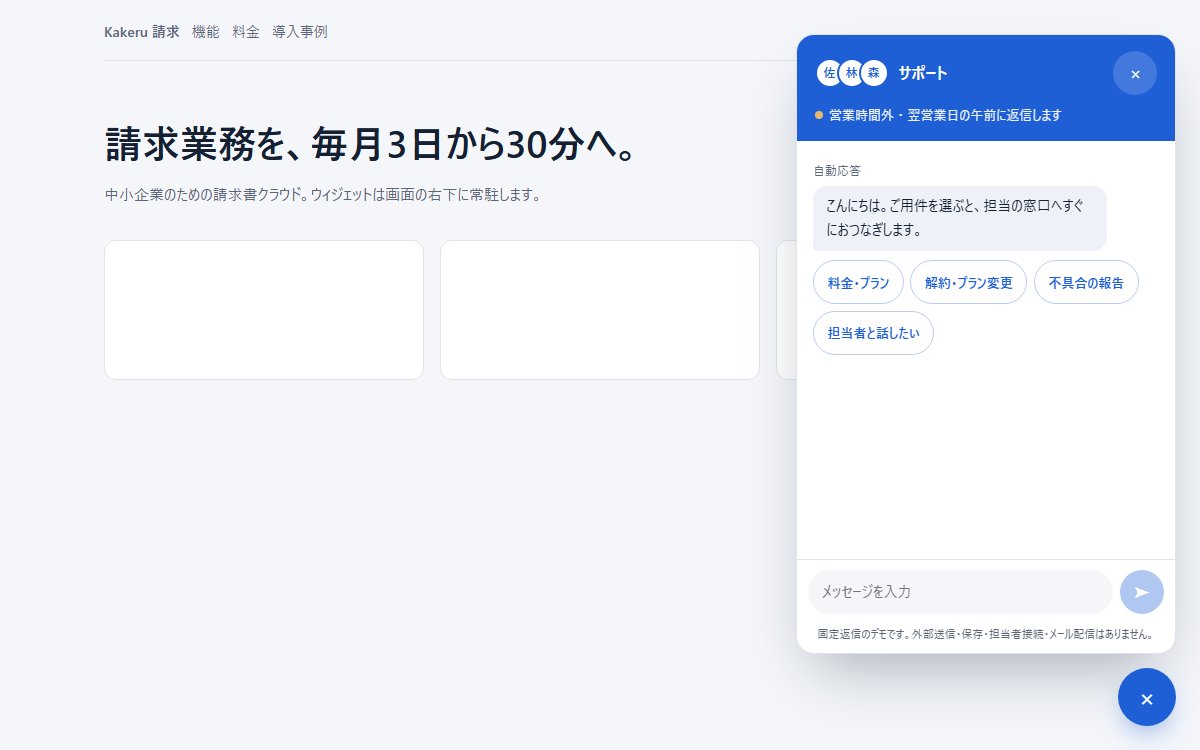
Webサイトの右下に常駐する問い合わせ用のチャットウィジェット。用件を選択肢で絞り込む自動応答、営業時間に応じて約束を変える表示、時間外はメールで引き取る導線、閉じている間の未読数までを備える。
このブラウザー内に保存します。別の端末との同期はなく、サイトデータを消すと保存も消えます。
印刷時は見本を静止画にし、プロンプトと解説を出力します。PDF保存はブラウザーの印刷画面から選べます。
Vibehaus · デザイン資料
https://vibe.itlibra.com/design/support-widget-chat/
完全無料・著作権フリー(CC0)· 料金¥0 · 商用利用・改変自由
プレビュー
指定幅で実際に組み替えて表示します。表示領域より広い場合は、この枠の中で横へスクロールできます。
AIへの指示文
Webサイトの右下に常駐するサポート用チャットウィジェットを作ってください。SaaS の問い合わせ窓口です。

要件:
- 配色: 地は #f4f6fa、ブランド色は青 #1f5fd6、自動応答の吹き出しは #eef2f8、文字 #152033。
- 画面右下に直径58pxの丸い起動ボタン。開くと、その上に幅380px・高さ最大620pxのパネルが右下を起点に拡大して出る。
- パネルのヘッダーに担当者の丸いアイコンを3つ重ねて並べ、「対応中・通常5分以内に返信します」の状態表示を出す。
- 最初の自動応答の下に、用件の選択肢を丸いボタンで4つ(料金・プラン/解約・プラン変更/不具合の報告/担当者と話したい)。
- 選択肢を押すと、自分の発言としてその文言を右に出し、自動応答が答え、次の選択肢を出す。使い終えた選択肢は薄くして押せなくする。
- 平日9〜18時の外では、状態表示を「営業時間外・翌営業日の午前に返信します」に変える。「担当者と話したい」を選んだら、つなぐと約束せず、メールアドレスを残せる小さなフォームを出す。
- 下部に自由入力の欄と送信ボタン、その下に「送信内容はプライバシーポリシーに沿って扱います」の一文。
- 閉じている間に返信が届いたら、起動ボタンの右上に赤い未読数を出す。
- パネルは role="dialog"(非モーダル)、会話の領域は role="log" と aria-live="polite"。Esc で閉じ、閉じたらフォーカスを起動ボタンへ戻す。
- 幅480px未満ではパネルを全画面にする。
- 背景には、ウィジェットの置き場所が分かるよう仮のサービスサイト(ナビ・見出し・カード)を薄く置く。
バリエーション
よくある質問の検索版
選択肢の代わりに、パネル上部に「よくある質問を検索」の入力欄を置く。
入力に合わせて質問の候補を3件まで出し、該当が無いときだけチャットに切り替える。
予約窓口版
用件の選択肢を「予約する/予約を変更する/キャンセルする」にする。
予約するを選ぶと、日付の候補を丸いボタンで5日分並べる。
このプレビューのコード
HTML・CSS・JavaScriptの1ファイルです。外部依存・広告・解析コードはありません。固定の選択肢と返信で進むデモです。営業時間の表示は端末時刻から再現します。外部送信・担当者への接続・メール配信・永続保存はありません。
コードを表示
<!doctype html>
<!-- Vibehaus — CC0。外部依存なし。固定返信のデモで、担当者接続・メール送信・保存は行わない。 -->
<html lang="ja">
  <head>
    <meta charset="utf-8" />
    <meta name="viewport" content="width=device-width, initial-scale=1" />
    <meta name="robots" content="noindex" />
    <title>選択肢で絞り込む右下のサポートチャット — Vibehaus プレビュー</title>
    <style>
      :root {
        --page: #f4f6fa;
        --ink: #152033;
        --muted: #5b6678;
        --line: #dfe4ec;
        --brand: #1f5fd6;
        --brand-ink: #ffffff;
        --bot: #eef2f8;
        --ok: #1e9e63;
        --warn: #c77a12;
        --font: "Inter", system-ui, -apple-system, "Hiragino Sans", "Hiragino Kaku Gothic ProN",
          "Yu Gothic Medium", "Yu Gothic", "Meiryo", sans-serif;
      }
      * { box-sizing: border-box; }
      body {
        margin: 0;
        min-height: 100vh;
        font-family: var(--font);
        font-size: 15px;
        line-height: 1.8;
        letter-spacing: 0;
        color: var(--ink);
        background: var(--page);
      }
      button, input { font: inherit; color: inherit; }
      button { cursor: pointer; }

      /* ---------- 背景のサイト(ウィジェットの置き場所を見せるための仮の画面) ---------- */
      .site { max-width: 1040px; margin: 0 auto; padding: 1.2rem 1.5rem 6rem; }
      .nav { display: flex; align-items: center; gap: 1.5rem; padding-bottom: 1rem; border-bottom: 1px solid var(--line); }
      .logo { font-weight: 800; }
      .nav span { font-size: 14px; color: var(--muted); }
      .hero { padding: 3.5rem 0 2rem; max-width: 560px; }
      .hero h1 { margin: 0 0 0.8rem; font-size: clamp(26px, 4vw, 38px); line-height: 1.35; }
      .hero p { margin: 0; color: var(--muted); }
      .cards { display: grid; grid-template-columns: repeat(auto-fit, minmax(200px, 1fr)); gap: 1rem; }
      .card { height: 140px; background: #ffffff; border: 1px solid var(--line); border-radius: 12px; }

      /* ---------- 起動ボタン ---------- */
      .launcher {
        position: fixed;
        right: 24px;
        bottom: 24px;
        z-index: 20;
        display: grid;
        place-items: center;
        width: 58px;
        height: 58px;
        font-size: 24px;
        color: var(--brand-ink);
        background: var(--brand);
        border: 0;
        border-radius: 50%;
        box-shadow: 0 12px 28px -10px rgba(31, 95, 214, 0.6);
      }
      .badge {
        position: absolute;
        top: -2px;
        right: -2px;
        min-width: 20px;
        height: 20px;
        padding: 0 5px;
        font-size: 12px;
        font-weight: 700;
        line-height: 20px;
        color: #ffffff;
        background: #e0443a;
        border: 2px solid var(--page);
        border-radius: 999px;
      }

      /* ---------- パネル ---------- */
      .panel {
        position: fixed;
        right: 24px;
        bottom: 96px;
        z-index: 20;
        display: flex;
        flex-direction: column;
        width: 380px;
        height: min(620px, calc(100vh - 120px));
        overflow: hidden;
        background: #ffffff;
        border: 1px solid var(--line);
        border-radius: 18px;
        box-shadow: 0 30px 60px -20px rgba(21, 32, 51, 0.35);
        transform-origin: bottom right;
        transition: transform 0.18s ease, opacity 0.18s ease;
      }
      .panel[hidden] { display: flex; transform: scale(0.92); opacity: 0; pointer-events: none; visibility: hidden; }

      .p-head { padding: 1rem 1.1rem 0.9rem; color: var(--brand-ink); background: var(--brand); }
      .p-top { display: flex; align-items: center; gap: 0.6rem; }
      .faces { display: flex; }
      .faces span {
        display: grid;
        place-items: center;
        width: 30px;
        height: 30px;
        margin-left: -8px;
        font-size: 12px;
        font-weight: 700;
        color: var(--brand);
        background: #ffffff;
        border: 2px solid var(--brand);
        border-radius: 50%;
      }
      .faces span:first-child { margin-left: 0; }
      .p-head h2 { margin: 0; font-size: 16px; line-height: 1.4; }
      .close {
        margin-left: auto;
        width: 30px;
        height: 30px;
        padding: 0;
        font-size: 18px;
        color: inherit;
        background: rgba(255, 255, 255, 0.16);
        border: 0;
        border-radius: 50%;
      }
      .status { display: flex; align-items: center; gap: 0.4rem; margin: 0.5rem 0 0; font-size: 13px; opacity: 0.92; }
      .dot { width: 8px; height: 8px; background: #5ee29a; border-radius: 50%; }

      .p-log { flex: 1; overflow-y: auto; padding: 1rem 1rem 0.5rem; scrollbar-width: thin; }
      .m { display: flex; margin: 0 0 0.6rem; }
      .m.me { justify-content: flex-end; }
      .m .b {
        max-width: 85%;
        padding: 0.55rem 0.85rem;
        font-size: 14px;
        line-height: 1.7;
        border-radius: 14px;
      }
      .m.bot .b { background: var(--bot); border-bottom-left-radius: 4px; }
      .m.me .b { color: var(--brand-ink); background: var(--brand); border-bottom-right-radius: 4px; }
      .who { margin: 0.2rem 0 0.25rem; font-size: 12px; color: var(--muted); }

      /* 選択肢。自由入力の前に、よくある用件へ1クリックで進める */
      .opts { display: flex; flex-wrap: wrap; gap: 0.4rem; margin: 0.2rem 0 0.8rem; }
      .opt {
        padding: 0.35rem 0.85rem;
        font-size: 13px;
        font-weight: 600;
        color: var(--brand);
        background: #ffffff;
        border: 1px solid #b9cbee;
        border-radius: 999px;
      }
      .opt:hover { background: #f1f5fd; }
      .opts.used .opt { opacity: 0.45; pointer-events: none; }

      .card-note {
        margin: 0.2rem 0 0.8rem;
        padding: 0.8rem 0.9rem;
        font-size: 13px;
        line-height: 1.7;
        background: #fff8ec;
        border: 1px solid #f1d7a6;
        border-radius: 12px;
      }
      .card-note b { color: var(--warn); }
      .mailform { display: flex; gap: 0.4rem; margin-top: 0.6rem; }
      .mailform input { flex: 1; min-width: 0; padding: 0.4rem 0.6rem; font-size: 13px; border: 1px solid var(--line); border-radius: 8px; }
      .mailform button { padding: 0.4rem 0.8rem; font-size: 13px; font-weight: 600; color: #ffffff; background: var(--brand); border: 0; border-radius: 8px; }

      .p-foot { display: flex; gap: 0.4rem; padding: 0.6rem 0.7rem; border-top: 1px solid var(--line); }
      .p-foot input { flex: 1; min-width: 0; padding: 0.5rem 0.8rem; font-size: 14px; background: var(--page); border: 1px solid transparent; border-radius: 999px; outline: 0; }
      .p-foot input:focus { border-color: #b9cbee; background: #ffffff; }
      .p-foot button { width: 38px; height: 38px; padding: 0; font-size: 16px; color: #ffffff; background: var(--brand); border: 0; border-radius: 50%; }
      .p-foot button:disabled { opacity: 0.35; cursor: default; }
      .legal { margin: 0; padding: 0 1rem 0.6rem; font-size: 11px; color: var(--muted); text-align: center; }
      .sr { position: absolute; width: 1px; height: 1px; overflow: hidden; clip: rect(0 0 0 0); white-space: nowrap; }
      :focus-visible { outline: 2px solid var(--brand); outline-offset: 2px; }

      @media (max-width: 480px) {
        .panel { inset: 0; width: auto; height: auto; border-radius: 0; }
        .launcher { right: 16px; bottom: 16px; }
      }
      @media (prefers-reduced-motion: reduce) {
        .panel { transition: none; }
      }
      [hidden] { display:none !important; }
      button,input { min-height:44px; }
      button { min-width:44px; }
      .p-foot button { width:44px; height:44px; flex:none; }
      .m .b { overflow-wrap:anywhere; }
      .nav { flex-wrap:wrap; gap:12px; }
      @media (max-width:480px) { .panel:not([hidden]) ~ .launcher { display:none; } }
    </style>
  </head>
  <body>
    <div class="site" aria-hidden="true">
      <div class="nav"><span class="logo">Kakeru 請求</span><span>機能</span><span>料金</span><span>導入事例</span></div>
      <div class="hero">
        <h1>請求業務を、毎月3日から30分へ。</h1>
        <p>中小企業のための請求書クラウド。ウィジェットは画面の右下に常駐します。</p>
      </div>
      <div class="cards"><div class="card"></div><div class="card"></div><div class="card"></div></div>
    </div>

    <section class="panel" id="panel" role="dialog" aria-modal="false" aria-labelledby="p-title">
      <header class="p-head">
        <div class="p-top">
          <div class="faces" aria-hidden="true"><span>佐</span><span>林</span><span>森</span></div>
          <h2 id="p-title">サポート</h2>
          <button class="close" id="close" type="button" aria-label="閉じる">×</button>
        </div>
        <p class="status" id="status"><span class="dot" aria-hidden="true"></span>対応中 ・ 通常5分以内に返信します</p>
      </header>

      <div class="p-log" id="log" role="log" aria-live="polite">
        <p class="who">自動応答</p>
        <div class="m bot"><div class="b">こんにちは。ご用件を選ぶと、担当の窓口へすぐにおつなぎします。</div></div>
        <div class="opts" id="first">
          <button class="opt" type="button" data-topic="price">料金・プラン</button>
          <button class="opt" type="button" data-topic="change">解約・プラン変更</button>
          <button class="opt" type="button" data-topic="bug">不具合の報告</button>
          <button class="opt" type="button" data-topic="human">担当者と話したい</button>
        </div>
      </div>

      <form class="p-foot" id="form">
        <label class="sr" for="text">メッセージ</label>
        <input id="text" autocomplete="off" placeholder="メッセージを入力" />
        <button type="submit" id="send" aria-label="送信" disabled>➤</button>
      </form>
      <p class="legal">固定返信のデモです。外部送信・保存・担当者接続・メール配信はありません。</p>
    </section>

    <button class="launcher" id="launcher" type="button" aria-controls="panel" aria-expanded="true" aria-label="サポートを閉じる">
      <span id="lIcon" aria-hidden="true">×</span>
      <span class="badge" id="badge" hidden>1</span>
    </button>

    <script>
      const panel = document.getElementById("panel");
      const launcher = document.getElementById("launcher");
      const lIcon = document.getElementById("lIcon");
      const badge = document.getElementById("badge");
      const log = document.getElementById("log");
      const form = document.getElementById("form");
      const text = document.getElementById("text");
      const send = document.getElementById("send");
      const status = document.getElementById("status");

      // 営業時間(平日9〜18時)の外では「担当者と話す」を約束しない
      const h = new Date().getHours();
      const d = new Date().getDay();
      const open = d >= 1 && d <= 5 && h >= 9 && h < 18;
      if (!open) {
        status.innerHTML = '<span class="dot" aria-hidden="true" style="background:#f3c16b"></span>営業時間外 ・ 翌営業日の午前に返信します';
      }

      const FLOW = {
        price: {
          say: "料金・プラン",
          reply: "プランは3つです。いちばん選ばれているのは月額4,980円のスタンダードで、請求書の枚数に上限がありません。",
          opts: [["plans", "プランを比べる"], ["human", "担当者と話したい"]],
        },
        change: {
          say: "解約・プラン変更",
          reply: "変更と解約は、管理画面の「契約」からいつでもできます。月の途中で変更した場合、差額は日割りで精算します。",
          opts: [["human", "担当者と話したい"]],
        },
        bug: {
          say: "不具合の報告",
          reply: "ご不便をおかけしています。起きた画面と時刻を教えてください。担当者が確認して、このチャットでお返事します。",
          opts: [],
        },
        plans: {
          say: "プランを比べる",
          reply: "料金ページに比較表があります。無料期間は14日で、期間中に解約すれば料金はかかりません。",
          opts: [["human", "担当者と話したい"]],
        },
      };

      function bubble(who, msg) {
        const m = document.createElement("div");
        m.className = "m " + who;
        const b = document.createElement("div");
        b.className = "b";
        b.textContent = msg;
        m.append(b);
        log.append(m);
        return m;
      }

      function options(list) {
        if (!list.length) return;
        const box = document.createElement("div");
        box.className = "opts";
        for (const [key, label] of list) {
          const btn = document.createElement("button");
          btn.type = "button";
          btn.className = "opt";
          btn.dataset.topic = key;
          btn.textContent = label;
          box.append(btn);
        }
        log.append(box);
      }

      function human() {
        bubble("me", "担当者と話したい");
        if (open) {
          bubble("bot", "担当者におつなぎします。そのままお待ちください(現在の待ち時間はおよそ3分です)。");
        } else {
          // 時間外に「おつなぎします」と言って放置するのが最悪の体験。約束できる形に切り替える
          const note = document.createElement("div");
          note.className = "card-note";
          note.innerHTML =
            "<b>ただいま営業時間外です。</b>平日9〜18時に担当者がお返事します。メールアドレスを残していただければ、翌営業日の午前中に連絡します。" +
            '<form class="mailform"><label class="sr" for="mail">メールアドレス</label><input id="mail" type="email" placeholder="you@example.com" required><button type="submit">送る</button></form>';
          log.append(note);
          const mailForm = note.querySelector('form');
          function confirmMail(e) {
            e.preventDefault();
            if (!mailForm.reportValidity()) return;
            note.querySelector("form").replaceWith(Object.assign(document.createElement("p"), { textContent: "デモの入力確認が完了しました。メールアドレスは送信・保存されていません。", style: "margin:0.5rem 0 0" }));
          }
          mailForm.addEventListener('submit', confirmMail);
          mailForm.querySelector('button').addEventListener('click', confirmMail);
          mailForm.querySelector('input').addEventListener('keydown', e => {
            if (e.key === 'Enter' && !e.isComposing && e.keyCode !== 229) confirmMail(e);
          });
        }
      }

      log.addEventListener("click", (e) => {
        const btn = e.target.closest(".opt");
        if (!btn) return;
        if (btn.disabled) return;
        btn.parentElement.classList.add("used");
        btn.parentElement.querySelectorAll('button').forEach(button => { button.disabled = true; });
        const topic = btn.dataset.topic;
        if (topic === "human") human();
        else {
          const f = FLOW[topic];
          bubble("me", f.say);
          bubble("bot", f.reply);
          options(f.opts);
        }
        log.scrollTop = log.scrollHeight;
      });

      text.addEventListener("input", () => (send.disabled = text.value.trim() === ""));
      function sendMessage(e) {
        e.preventDefault();
        if (!text.value.trim()) return;
        bubble("me", text.value.trim());
        text.value = "";
        send.disabled = true;
        setTimeout(() => {
          bubble("bot", "ありがとうございます。内容を担当者に引き継ぎました。");
          log.scrollTop = log.scrollHeight;
        }, 700);
        log.scrollTop = log.scrollHeight;
      }
      form.addEventListener('submit', sendMessage);
      send.addEventListener('click', sendMessage);
      text.addEventListener('keydown', e => {
        if (e.key === 'Enter' && !e.isComposing && e.keyCode !== 229) sendMessage(e);
      });

      function toggle(show) {
        panel.hidden = !show;
        launcher.setAttribute("aria-expanded", String(show));
        launcher.setAttribute("aria-label", show ? "サポートを閉じる" : "サポートを開く");
        lIcon.textContent = show ? "×" : "💬";
        if (show) {
          badge.hidden = true;
          text.focus();
        } else launcher.focus();
      }
      launcher.addEventListener("click", () => toggle(panel.hidden));
      document.getElementById("close").addEventListener("click", () => {
        toggle(false);
        // 閉じている間に届いた返信は、起動ボタンの数字で知らせる
        setTimeout(() => (badge.hidden = !panel.hidden), 1500);
      });
      document.addEventListener("keydown", (e) => {
        if (e.key === "Escape" && !panel.hidden) toggle(false);
      });
    </script>
  </body>
</html>
2026年10月14日、Chromiumで320・390・768・1280pxの描画とキーボードのフォーカス表示を確認しました。他のブラウザは未確認です。利用先のブラウザと実データでも確認してください。
概要
画面の右下に丸いボタンが1つだけあり、押すと小さな窓が開く。2010年代にSaaSの問い合わせ窓口として広まったこの形は、いまや問い合わせの入口がどこにあるかを探させないための定位置になりました。利用者は右下を見れば聞けると知っています。
自由入力の前に選択肢を置く
空の入力欄だけを見せると、多くの人は何を書けばいいか分からず手が止まります。問い合わせの大半は、料金・解約・不具合といった決まった用件に集まります。
崩れる形空の入力欄だけを出す
何を書けばいいか分からない人は、そこで閉じて帰ります。書いてくれた人の問い合わせも、すべて有人対応に流れ込みます。
効く形よくある用件を選択肢で出す
1クリックで答えにたどり着く人が増え、担当者が本当に必要な相談だけが残ります。自由入力は、選択肢で足りない人のために残すものです。
約束できることだけを約束する
有人対応の時間が限られているなら、表示もそれに合わせて変えます。営業時間外に「担当者におつなぎします」と出して誰も来ない状態は、問い合わせ窓口が無いよりも印象を損ねます。
時間外は、返信の目安を正直に示し、メールで引き取る。つなげない時間につなぐと言わないことが、この部品の信頼のすべてです。
仕上げの判断軸
ページを開いた瞬間にパネルを自動で開くのは避けてください。読みたい内容の上に割り込み、閉じる操作を強いることになります。起動ボタンだけを置き、返信が届いたときは未読数で知らせる程度に留めます。
パネルはモーダルにしないのが基本です。問い合わせながら料金表を見比べたい人もいるので、背後のページは操作できるままにし、Esc で閉じたらフォーカスを起動ボタンへ戻します。
チャットの構成要素
使いどころ
- SaaS やECの問い合わせ窓口
- 料金ページや申し込みフォームでの離脱防止
- 有人対応の時間が限られる小規模なサポート体制
- よくある質問への自動応答と有人対応の振り分け
このデザインの分類
背景と狙いどころ
よくある質問
最初から自由入力だけにしないのはなぜ?
営業時間外はウィジェットを隠したほうがいい?
ページを開いた瞬間にパネルを自動で開くべき?
この画面を実装する
動くサンプルとコピペできるコードを、技術別にまとめています。
関連するデザイン

既読と日付区切りのある和製トーク画面
日本のスマホで最も見慣れたトーク画面の文法を再現したチャットUI。青みの地に緑と白の吹き出し、吹き出しの外に置く時刻と既読の人数、日付の札、連投でしっぽと名前を省く組み方までを1枚にまとめる。

流れて出るAIアシスタントのチャット画面
左に会話の履歴、中央に質問と回答を並べるAIアシスタント型のチャット画面。回答が一文字ずつ流れて出る表示、生成の停止、コードのコピー、日本語入力の変換確定で誤送信しない入力欄までを1枚で再現する。

Discord/Slack風の3ペイン・チャット画面
Discord・Slack のチャットUIを再構築した3ペインインターフェイス。サーバーリスト+チャンネル+メッセージスレッド+リアクション・スレッドの定番構成を CSS だけで網羅する尖った設計。