機能紹介 · 機能紹介セクション
建築設計図風の機能紹介
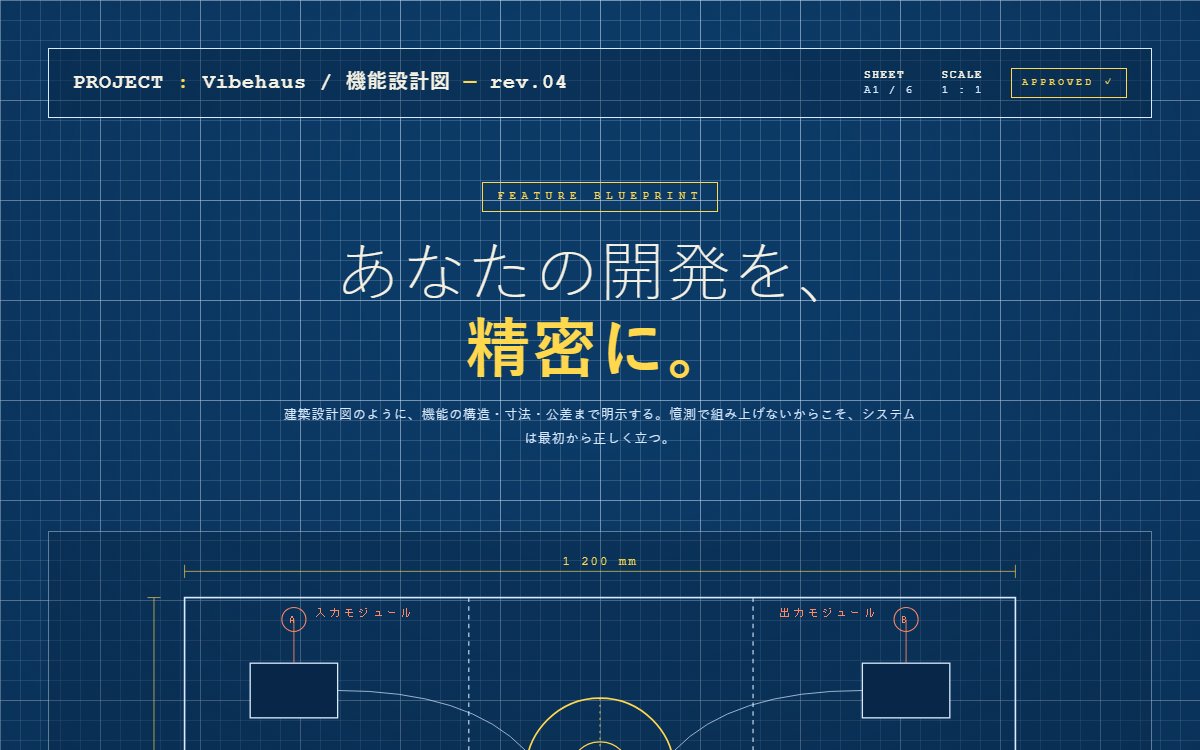
建築・CAD図面のブループリントを再構築した機能紹介セクション。シアンブルーの方眼背景・寸法線・断面記号・コールアウトで「精密に設計された製品」の信頼感を技術的なビジュアルで叩きつける尖った設計。
このブラウザー内に保存します。別の端末との同期はなく、サイトデータを消すと保存も消えます。
印刷時は見本を静止画にし、プロンプトと解説を出力します。PDF保存はブラウザーの印刷画面から選べます。
Vibehaus · デザイン資料
https://vibe.itlibra.com/design/blueprint-feature/
完全無料・著作権フリー(CC0)· 料金¥0 · 商用利用・改変自由
プレビュー
指定幅で実際に組み替えて表示します。表示領域より広い場合は、この枠の中で横へスクロールできます。
AIへの指示文
エンジニアリング系SaaSの機能紹介セクションを、建築設計図のブループリントとして作ってください。

要件:
- 配色: 製図シアン #0c3a66 + 紙白 #f5f1e3 + 線水色 #d8eaff + 黄 #ffd84d (アクセント) + 朱 #ff8763 (注釈)。
- 全画面に方眼グリッド背景(CSS multi-layer linear-gradient で 20px と 100px の二段方眼)。
- 上部に図面タイトルブロック: PROJECT 名 / SHEET 番号 / SCALE / APPROVED スタンプの横並び。1pxのボーダーで囲う。
- メイン: 大きな技術図面 SVG(aspect 16:7)
  - 中央に円形のコアモジュール(同心円 + 十字補助線)
  - 左右に矩形モジュール(入出力ノード)
  - ノード間をベジェ曲線で接続
  - 上下左右に寸法線(dimension line、矢印 + 数値ラベル「1 200 mm」「800」)
  - コールアウト記号(A/B/C を○で囲んで引出線)
- 機能カード3枚(border 1px シアン、横並び):
  - 番号 №01-03
  - 線画 SVG アイコン(80×80、stroke のみ、currentColor)
  - 見出し(和文)+ ローマ字サブ
  - 本文 + 仕様(公差・分解能・SLA 等の技術的数値)
- 下部リビジョンバー: REV / DATE / DRAWN / CHECKED / APPROVED の縦書きラベル。
- フォント: 全体は JetBrains Mono / IBM Plex Mono、見出しのみ Helvetica Neue / Yu Gothic。
- JS不要、フルレスポンシブ。
バリエーション
機械図面版(ホワイト背景)
背景を白 #f5f1e3、線を黒 #14110d に反転。製造業の組立図面風に。
ハッチング(断面記号、斜線パターン)を SVG <pattern> で追加。
古典青写真版(ヴィンテージ)
色をくすませて #1a3a5c の褪色した青に、紙感ノイズを feTurbulence で重ねる。
フォントを Courier Prime(タイプライター)に。
このプレビューのコード
HTMLとCSSの1ファイルです。外部依存・広告・解析コードはありません。CSSの方眼とインラインSVGで描く設計図の表示見本です。性能値・承認印・担当者は架空の設定で、実際の計測や認証ではありません。
コードを表示
<!doctype html>
<!-- Vibehaus — CC0。外部素材・ライブラリ不要の1ファイル版。製品・性能値・認証は架空の表示見本です。 -->
<html lang="ja">
<head>
<meta charset="utf-8">
<meta name="viewport" content="width=device-width, initial-scale=1">
<meta name="robots" content="noindex,nofollow">
<title>blueprint-feature preview</title>
<style>
  :root {
    --bg: #0c3a66;
    --bg-deep: #082748;
    --line: #d8eaff;
    --line-soft: rgba(216,234,255,0.42);
    --line-faint: rgba(216,234,255,0.18);
    --paper: #f5f1e3;
    --accent: #ffd84d;
    --warn: #ff8763;
  }
  *, *::before, *::after { box-sizing: border-box; }
  html, body { margin: 0; padding: 0; }
  body {
    background: var(--bg);
    color: var(--line);
    font-family: "JetBrains Mono", "IBM Plex Mono", "Space Mono", "Courier New", "Yu Gothic", "Noto Sans JP", monospace;
    line-height: 1.6;
    min-height: 100vh;
    background-image:
      linear-gradient(var(--line-faint) 1px, transparent 1px),
      linear-gradient(90deg, var(--line-faint) 1px, transparent 1px),
      linear-gradient(var(--line-soft) 1px, transparent 1px),
      linear-gradient(90deg, var(--line-soft) 1px, transparent 1px);
    background-size: 20px 20px, 20px 20px, 100px 100px, 100px 100px;
    -webkit-font-smoothing: antialiased;
  }
  body::before {
    content: "";
    position: fixed; inset: 0; pointer-events: none;
    background: radial-gradient(ellipse at 50% 30%, transparent 30%, rgba(8,39,72,0.4) 100%);
    z-index: 0;
  }
  .wrap {
    position: relative;
    max-width: 1280px;
    margin: 0 auto;
    padding: clamp(28px, 4vw, 56px);
    z-index: 1;
  }

  /* Title block */
  .titleblock {
    border: 1px solid var(--line);
    background: rgba(8,39,72,0.5);
    padding: 18px 24px;
    display: grid;
    grid-template-columns: 1fr auto auto auto;
    gap: 28px;
    align-items: center;
    font-size: 11px;
    letter-spacing: 0.18em;
    text-transform: uppercase;
  }
  .titleblock .project {
    font-size: 20px;
    letter-spacing: 0.05em;
    text-transform: none;
    color: var(--paper);
    font-weight: 700;
  }
  .titleblock .project span { color: var(--accent); }
  .titleblock .meta {
    font-size: 10.5px;
    line-height: 1.4;
  }
  .titleblock .meta b { color: var(--paper); display: block; font-weight: 600; }
  .titleblock .stamp {
    border: 1px solid var(--accent);
    color: var(--accent);
    padding: 6px 10px;
    font-size: 10px;
    letter-spacing: 0.3em;
  }

  /* Hero */
  .hero {
    margin-top: 64px;
    text-align: center;
    position: relative;
  }
  .hero .eyebrow {
    display: inline-block;
    color: var(--accent);
    font-size: 11px;
    letter-spacing: 0.5em;
    border: 1px solid var(--accent);
    padding: 5px 14px;
    margin-bottom: 24px;
  }
  .hero h1 {
    font-family: "Helvetica Neue", "Yu Gothic", "Noto Sans JP", sans-serif;
    font-weight: 200;
    color: var(--paper);
    font-size: clamp(34px, 5.4vw, 68px);
    line-height: 1.35;
    letter-spacing: 0.02em;
    margin: 0 0 14px;
    text-transform: uppercase;
  }
  .hero h1 b {
    font-weight: 800;
    color: var(--accent);
    letter-spacing: 0.04em;
  }
  .hero p {
    max-width: 640px;
    margin: 0 auto;
    color: var(--line);
    font-size: 13px;
    letter-spacing: 0.06em;
    line-height: 1.85;
    font-family: "Helvetica Neue", "Yu Gothic", sans-serif;
  }

  /* Diagram */
  .diagram {
    position: relative;
    margin: 80px 0 100px;
    aspect-ratio: 16 / 7;
    border: 1px solid var(--line-soft);
    background: rgba(8,39,72,0.35);
  }
  .diagram svg { width: 100%; height: 100%; display: block; }

  /* Feature grid - architectural callouts */
  .features {
    display: grid;
    grid-template-columns: repeat(3, 1fr);
    gap: 0;
    border: 1px solid var(--line);
    background: rgba(8,39,72,0.5);
  }
  @media (max-width: 920px) {
    .features { grid-template-columns: 1fr; }
  }
  .cell {
    padding: 32px;
    border-right: 1px solid var(--line-soft);
    position: relative;
  }
  .cell:last-child { border-right: 0; }
  @media (max-width: 920px) {
    .cell { border-right: 0; border-bottom: 1px solid var(--line-soft); }
    .cell:last-child { border-bottom: 0; }
  }

  .cell .num {
    position: absolute;
    top: 18px; right: 22px;
    color: var(--accent);
    font-size: 11px;
    letter-spacing: 0.25em;
  }
  .cell .icon {
    width: 80px; height: 80px;
    margin-bottom: 20px;
    color: var(--line);
  }
  .cell h3 {
    font-family: "Helvetica Neue", "Yu Gothic", sans-serif;
    font-size: 20px;
    color: var(--paper);
    font-weight: 700;
    margin: 0 0 4px;
    letter-spacing: 0.02em;
  }
  .cell .romaji {
    font-size: 10px;
    letter-spacing: 0.4em;
    color: var(--accent);
    text-transform: uppercase;
    margin-bottom: 18px;
  }
  .cell p {
    font-family: "Helvetica Neue", "Yu Gothic", sans-serif;
    font-size: 13px;
    line-height: 1.85;
    color: var(--line);
    margin: 0 0 22px;
    letter-spacing: 0.04em;
  }
  .cell .specs {
    border-top: 1px dashed var(--line-soft);
    padding-top: 14px;
    display: flex;
    gap: 18px;
    font-size: 10px;
    letter-spacing: 0.18em;
    text-transform: uppercase;
  }
  .cell .specs span { color: var(--line); opacity: 0.85; }
  .cell .specs b { color: var(--accent); margin-right: 6px; }

  /* Bottom revision bar */
  .revision {
    margin-top: 48px;
    border-top: 1px solid var(--line-soft);
    padding-top: 18px;
    display: grid;
    grid-template-columns: repeat(5, 1fr);
    gap: 16px;
    font-size: 10px;
    letter-spacing: 0.2em;
    text-transform: uppercase;
  }
  .revision .col { border-right: 1px dashed var(--line-faint); padding-right: 12px; }
  .revision .col:last-child { border-right: 0; }
  .revision .col h5 {
    margin: 0 0 4px;
    color: var(--accent);
    font-size: 9.5px;
    letter-spacing: 0.4em;
    font-weight: 400;
  }
  .revision .col p {
    margin: 0;
    color: var(--paper);
    font-size: 11px;
    letter-spacing: 0.1em;
  }
  @media (max-width: 920px) {
    .revision { grid-template-columns: repeat(2, 1fr); }
  }

      /* 配布前の実幅監査: 内容を切らず、デモの行き先を示す */
      .titleblock > *, .revision > *, .cell { min-width: 0; }
      .cell .specs { flex-wrap: wrap; }
      .demo-note { max-width: 1168px; margin: 0 auto 2rem; padding: 0 28px; color: var(--line); }
      @media (max-width: 640px) {
        .titleblock { grid-template-columns: repeat(3, minmax(0, 1fr)); gap: 16px 10px; padding: 18px; }
        .titleblock .project { grid-column: 1 / -1; overflow-wrap: anywhere; }
        .titleblock .stamp { letter-spacing: 0.08em; padding: 6px; overflow-wrap: anywhere; }
        .revision { gap: 16px 10px; }
        .revision .col p { overflow-wrap: anywhere; }
      }
      .demo-note { font-size: 0.85rem; line-height: 1.8; letter-spacing: 0; }
    </style>
</head>
<body>
  <div class="wrap">
    <div class="titleblock">
      <div class="project">PROJECT <span>:</span> Vibehaus / 機能設計図 <span>—</span> rev.04</div>
      <div class="meta"><b>SHEET</b>A1 / 6</div>
      <div class="meta"><b>SCALE</b>1 : 1</div>
      <div class="stamp">APPROVED ✓</div>
    </div>

    <section class="hero">
      <span class="eyebrow">FEATURE BLUEPRINT</span>
      <h1>あなたの開発を、<br><b>精密に。</b></h1>
      <p>建築設計図のように、機能の構造・寸法・公差まで明示する。憶測で組み上げないからこそ、システムは最初から正しく立つ。</p>
    </section>

    <div class="diagram">
      <svg viewBox="0 0 1000 440" preserveAspectRatio="xMidYMid meet" aria-hidden="true">
        <!-- main outline -->
        <rect x="120" y="60" width="760" height="320" fill="none" stroke="#d8eaff" stroke-width="1.5"/>
        <!-- inner divisions -->
        <line x1="380" y1="60" x2="380" y2="380" stroke="#d8eaff" stroke-width="1" stroke-dasharray="4 4"/>
        <line x1="640" y1="60" x2="640" y2="380" stroke="#d8eaff" stroke-width="1" stroke-dasharray="4 4"/>
        <line x1="120" y1="220" x2="880" y2="220" stroke="#d8eaff" stroke-width="0.8" opacity="0.55"/>

        <!-- core circle -->
        <circle cx="500" cy="220" r="68" fill="none" stroke="#ffd84d" stroke-width="1.5"/>
        <circle cx="500" cy="220" r="28" fill="none" stroke="#ffd84d" stroke-width="1"/>
        <circle cx="500" cy="220" r="3" fill="#ffd84d"/>
        <line x1="500" y1="152" x2="500" y2="288" stroke="#ffd84d" stroke-width="0.8" stroke-dasharray="2 4"/>
        <line x1="432" y1="220" x2="568" y2="220" stroke="#ffd84d" stroke-width="0.8" stroke-dasharray="2 4"/>

        <!-- nodes -->
        <g fill="#082748" stroke="#d8eaff" stroke-width="1.2">
          <rect x="180" y="120" width="80" height="50"/>
          <rect x="180" y="270" width="80" height="50"/>
          <rect x="740" y="120" width="80" height="50"/>
          <rect x="740" y="270" width="80" height="50"/>
        </g>

        <!-- connections -->
        <g stroke="#d8eaff" stroke-width="0.9" fill="none" opacity="0.72">
          <path d="M260 145 Q 380 145 432 200"/>
          <path d="M260 295 Q 380 295 432 240"/>
          <path d="M740 145 Q 620 145 568 200"/>
          <path d="M740 295 Q 620 295 568 240"/>
        </g>

        <!-- dimension lines top -->
        <g stroke="#ffd84d" stroke-width="0.6">
          <line x1="120" y1="36" x2="880" y2="36"/>
          <line x1="120" y1="30" x2="120" y2="42"/>
          <line x1="880" y1="30" x2="880" y2="42"/>
        </g>
        <text x="500" y="30" fill="#ffd84d" font-size="11" text-anchor="middle" letter-spacing="2">1 200 mm</text>

        <!-- dimension left -->
        <g stroke="#ffd84d" stroke-width="0.6">
          <line x1="92" y1="60" x2="92" y2="380"/>
          <line x1="86" y1="60" x2="98" y2="60"/>
          <line x1="86" y1="380" x2="98" y2="380"/>
        </g>
        <text x="78" y="225" fill="#ffd84d" font-size="11" text-anchor="middle" letter-spacing="2" transform="rotate(-90 78 225)">800</text>

        <!-- callouts -->
        <g font-family="JetBrains Mono, monospace" font-size="10" fill="#d8eaff" letter-spacing="2">
          <line x1="220" y1="120" x2="220" y2="80" stroke="#ff8763" stroke-width="0.8"/>
          <circle cx="220" cy="80" r="11" fill="none" stroke="#ff8763" stroke-width="1"/>
          <text x="220" y="84" text-anchor="middle" fill="#ff8763">A</text>
          <text x="240" y="78" fill="#ff8763">入力モジュール</text>

          <line x1="780" y1="120" x2="780" y2="80" stroke="#ff8763" stroke-width="0.8"/>
          <circle cx="780" cy="80" r="11" fill="none" stroke="#ff8763" stroke-width="1"/>
          <text x="780" y="84" text-anchor="middle" fill="#ff8763">B</text>
          <text x="755" y="78" text-anchor="end" fill="#ff8763">出力モジュール</text>

          <line x1="500" y1="288" x2="500" y2="410" stroke="#ffd84d" stroke-width="0.8"/>
          <circle cx="500" cy="410" r="11" fill="none" stroke="#ffd84d" stroke-width="1"/>
          <text x="500" y="414" text-anchor="middle" fill="#ffd84d">C</text>
          <text x="520" y="414" fill="#ffd84d">コアプロセッサ ø 136</text>
        </g>
      </svg>
    </div>

    <div class="features">
      <article class="cell">
        <span class="num">№ 01</span>
        <svg class="icon" viewBox="0 0 80 80" fill="none" stroke="currentColor" stroke-width="1.5">
          <rect x="10" y="14" width="60" height="52" rx="2"/>
          <line x1="10" y1="28" x2="70" y2="28"/>
          <circle cx="18" cy="21" r="1.6" fill="currentColor"/>
          <circle cx="24" cy="21" r="1.6" fill="currentColor"/>
          <line x1="20" y1="42" x2="60" y2="42"/>
          <line x1="20" y1="50" x2="48" y2="50"/>
          <line x1="20" y1="58" x2="56" y2="58"/>
        </svg>
        <h3>精密な構造定義</h3>
        <p class="romaji">SCHEMATIC</p>
        <p>各モジュールは入出力・寸法・許容値まで仕様化。図面の通りに組み立てるだけで、想定外の挙動が起こらない世界。</p>
        <div class="specs">
          <span><b>規格</b>ISO-A4</span>
          <span><b>許容</b>± 0.1mm</span>
        </div>
      </article>

      <article class="cell">
        <span class="num">№ 02</span>
        <svg class="icon" viewBox="0 0 80 80" fill="none" stroke="currentColor" stroke-width="1.5">
          <circle cx="40" cy="40" r="26"/>
          <circle cx="40" cy="40" r="14"/>
          <line x1="40" y1="6" x2="40" y2="74"/>
          <line x1="6" y1="40" x2="74" y2="40"/>
          <line x1="16" y1="16" x2="64" y2="64" stroke-dasharray="3 3"/>
          <line x1="64" y1="16" x2="16" y2="64" stroke-dasharray="3 3"/>
        </svg>
        <h3>計測可能な性能</h3>
        <p class="romaji">METRICS</p>
        <p>すべての特性が観測可能・計測可能。憶測ではなく実測値で語れるから、改善点もボトルネックも一目で分かる。</p>
        <div class="specs">
          <span><b>分解能</b>1ms</span>
          <span><b>更新</b>60Hz</span>
        </div>
      </article>

      <article class="cell">
        <span class="num">№ 03</span>
        <svg class="icon" viewBox="0 0 80 80" fill="none" stroke="currentColor" stroke-width="1.5">
          <path d="M14 60 L40 18 L66 60 Z"/>
          <line x1="40" y1="18" x2="40" y2="60"/>
          <line x1="22" y1="46" x2="58" y2="46" stroke-dasharray="2 2"/>
          <circle cx="40" cy="38" r="3" fill="currentColor"/>
          <line x1="14" y1="68" x2="66" y2="68"/>
          <line x1="14" y1="68" x2="14" y2="72"/>
          <line x1="66" y1="68" x2="66" y2="72"/>
        </svg>
        <h3>耐荷重と冗長性</h3>
        <p class="romaji">REDUNDANCY</p>
        <p>負荷が想定の3倍掛かっても破綻しないようバッファ設計。三角形の安定性で支える、本物の信頼性。</p>
        <div class="specs">
          <span><b>SLA</b>99.99%</span>
          <span><b>備機</b>×2</span>
        </div>
      </article>
    </div>

    <div class="revision">
      <div class="col">
        <h5>REV</h5>
        <p>04</p>
      </div>
      <div class="col">
        <h5>DATE</h5>
        <p>2026.04.27</p>
      </div>
      <div class="col">
        <h5>DRAWN</h5>
        <p>K. SATO</p>
      </div>
      <div class="col">
        <h5>CHECKED</h5>
        <p>M. NISHIMURA</p>
      </div>
      <div class="col">
        <h5>APPROVED</h5>
        <p>T. YAMADA</p>
      </div>
    </div>
  </div>
<aside class="demo-note" aria-label="表示見本について"><p>表示見本です。性能値・規格・承認印・担当者は架空の設定です。実際の計測・認証・承認を示すものではありません。</p></aside>
  </body>
</html>
2026年10月14日、Chromiumで320・390・768・1280pxの描画とキーボードのフォーカス表示を確認しました。他のブラウザは未確認です。利用先のブラウザと実データでも確認してください。
概要
建築の世界では、施工の前に必ず設計図(ブループリント)が引かれます。寸法線、断面記号、引出線付きの注釈——図面とは「これは正確に設計された」という証明書そのものです。エンジニアリング系プロダクトの機能紹介にこの様式を与えるのは、その「精密さの証明」を借用する試みです。
「ちゃんと設計されている」を視覚で証明する
エンジニアや建築家、メイカーといった技術者は、言葉での「高品質です」を信用しません。彼らが信用するのは、構造そのものが見えることです。方眼グリッド、寸法線、コールアウト記号は、機能を「曖昧な売り文句」ではなく「測定可能な設計対象」として提示します。一般的なfeatureグリッドが感情に訴えるのに対し、ブループリントは知性に訴えます。技術者を相手にするなら、後者のほうがはるかに深く刺さります。
様式が放つ「同類だ」というシグナル
サニタイズされた量産SaaS UIは、誰にでも向けて作られています。ブループリントの図面言語は逆に、「これを読める人」だけに向けたメッセージです。シアンブルーの方眼を見た技術者は、無意識に「これは自分たちの文化を理解している作り手だ」と感じる。様式は装飾である以前に、ターゲットを選別し、その内側の人間に強く語りかけるフィルターとして働きます。
崩れる形数字を飾りとして散らす
図面らしく見せるために意味のない寸法線を置くと、技術者はすぐ見抜きます。精密さを装った瞬間に、精密さの主張そのものが信用を失います。
効く形実際に意味のある値を指す
寸法線とコールアウトが本当の仕様を指していれば、機能は売り文句ではなく測定可能な設計対象として読まれます。これが技術者に効く唯一の書き方です。
仕上げの判断軸
寸法線やコールアウトは「実際に意味のある情報」を指していること——ただの飾りとして数字を散らすと、技術者はすぐ見抜きます。方眼グリッドはCSSのlinear-gradientで軽量に描けます。
シアン地は青色覚特性への配慮が要ります。本文は十分に明るい文字色で、コントラストを実測して確保してください。
エンジニアリング、建築、製造業、技術ドキュメント——図面が日常言語である領域でこそ、この様式は本領を発揮します。
機能紹介の構成要素
使いどころ
- エンジニアリング・建築・製造業のSaaS
- CADツール、3Dモデリング系プロダクト
- インフラ・DevOps・観測ツール
- 技術ドキュメント・APIリファレンスの表紙
- メイカー・DIY・ハードウェアスタートアップ
このデザインの分類
背景と狙いどころ
よくある質問
方眼グリッドはどう実装する?
寸法線のフックはどう描く?
アクセシビリティは大丈夫?
この画面を実装する
動くサンプルとコピペできるコードを、技術別にまとめています。
関連するデザイン

B2Bコーポレートの機能紹介セクション
B2B SaaSやエンタープライズ製品向けの機能紹介セクション。落ち着いた寒色配色と整然としたグリッド、データ感のあるアイコンで「実用と信頼」を伝える設計。

寒色グラデーションのAIツール機能紹介
紺の地に水色から藍色へのグラデーションを重ねた、AI議事録ツールの機能紹介セクション。見出しの一部だけを文字の幅で塗り、大きなカード1枚と小さなカード3枚で「何がどれだけ減るか」を数字と帯の長さで見せる。

アイソメトリック投影の機能紹介セクション
30度傾斜の擬似3DでUIカードを浮かべる、未来感のあるアイソメトリック機能紹介。Stripe・Linear・Vercel系のモダンSaaSの定番表現を CSS だけで再現する尖った設計。