認証 · ログインフォーム
マスコットが見守る新規登録画面
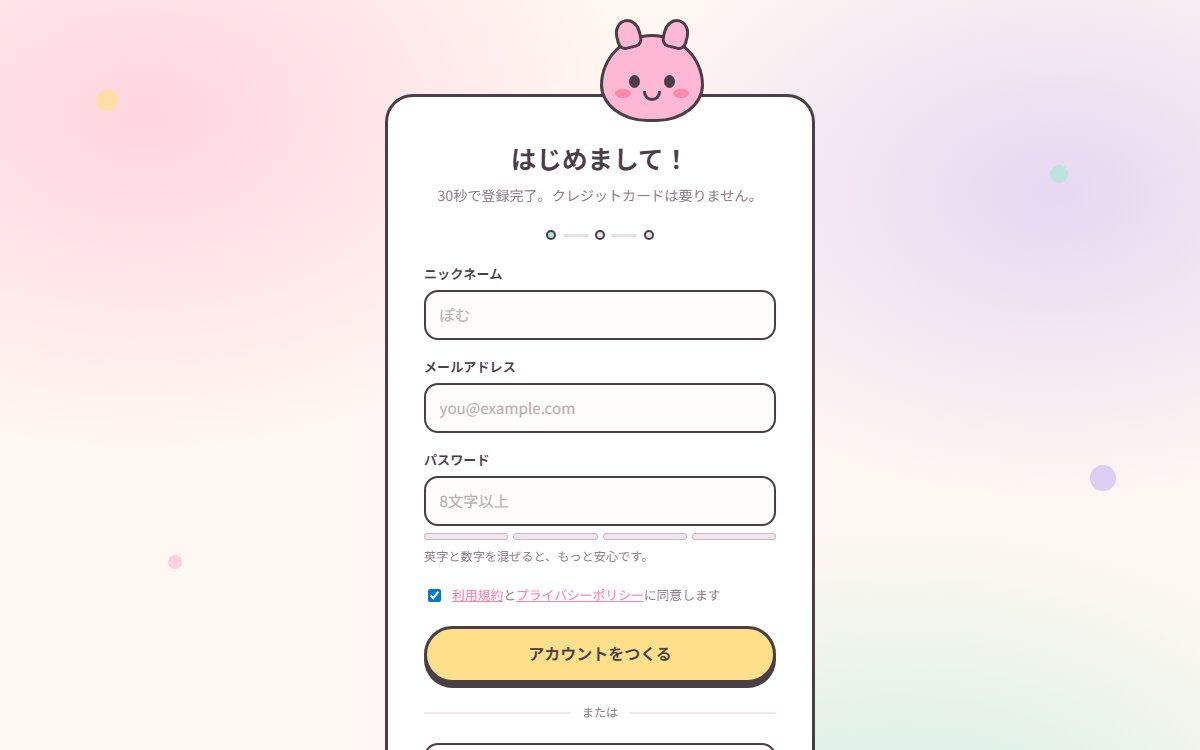
丸みとパステル、CSSのマスコットを組み合わせた新規登録画面。必須項目・メール形式・同意を確認し、文字数と文字種をメーターに表示。3ステップのうち入力段階を試せる見本です。
このブラウザー内に保存します。別の端末との同期はなく、サイトデータを消すと保存も消えます。
印刷時は見本を静止画にし、プロンプトと解説を出力します。PDF保存はブラウザーの印刷画面から選べます。
Vibehaus · デザイン資料
https://vibe.itlibra.com/design/kawaii-signup-auth/
完全無料・著作権フリー(CC0)· 料金¥0 · 商用利用・改変自由
プレビュー
指定幅で実際に組み替えて表示します。表示領域より広い場合は、この枠の中で横へスクロールできます。
AIへの指示文
個人向けサービスの新規登録(サインアップ)画面を、かわいい系のデザインで作ってください。

要件:
- 配色: クリーム地 #fff8f2、桜色 #ffb8d1、濃桜 #ff7fa8、ミント #a8e6d3、レモン #ffe08a、ライラック #cdb8f2、文字は黒でなく茶がかった #4a3f47。
- 背景は3枚の radial-gradient を重ねた淡い光。四隅に小さな円を浮かべ、5秒前後で上下に揺らす。
- 中央にカード: 白地、角丸28px、3pxの濃色ボーダー、下に硬い影(box-shadow の y方向のみ)。
- カード上端にマスコットの顔を半分はみ出させる。画像は使わず、border-radius と疑似要素だけで耳・目・ほお・口を組む。
- 入力欄は角丸14px・2.5pxボーダー、フォーカスで桜色の4px外周グロー。
- パスワードの文字数と文字種に応じて4分割のメーターを表示し、8文字までの残り文字数など具体的な一文を添える。安全性を判定するメーターとは表示しない。
- 主ボタンはピル型・レモン色・3pxボーダー + 5pxの硬い影。押すと沈む(translateY + 影を縮める)。
- 上部に3ステップの進捗ドットを置き、登録が何段階かを先に見せる。
- フォントは丸ゴシック優先(Hiragino Maru Gothic ProN → Quicksand → Noto Sans JP)。
- prefers-reduced-motion では揺れを止める。
バリエーション
ログイン版
入力欄をメールとパスワードだけにして、進捗ドットを削る。
マスコットは目を閉じた表情にして「おかえりなさい」の見出しにする。
子ども向け学習サービス版
配色をさらに高彩度にし、ニックネーム欄の隣にアバター選択(丸いアイコン6種)を追加する。
このプレビューのコード
HTML・CSS・JavaScriptの1ファイルです。外部依存・広告・解析コードはありません。登録画面の入力見本です。必須項目・メール形式・8文字以上・同意を確認し、入力を消去します。メーターは文字数と文字種の表示デモで、安全性の判定・登録・外部認証・送信・保存は行いません。
コードを表示
<!doctype html>
<!-- Vibehaus · CC0 · 架空の登録表示見本。外部依存・送信・登録・永続保存なし。 -->
<html lang="ja">
  <head>
    <meta charset="utf-8" />
    <meta name="viewport" content="width=device-width, initial-scale=1" />
    <meta name="robots" content="noindex" />
    <title>マスコットが見守る新規登録画面 — Vibehaus プレビュー</title>
    <style>
      :root {
        --cream: #fff8f2;
        --pink: #ffb8d1;
        --pink-deep: #ff7fa8;
        --mint: #a8e6d3;
        --lemon: #ffe08a;
        --lilac: #cdb8f2;
        --ink: #4a3f47;
        --ink-dim: #6b5c66;
        --card: #ffffff;
      }
      * { box-sizing: border-box; }
      html, body { margin: 0; padding: 0; }
      body {
        min-height: 100vh;
        display: flex;
        align-items: center;
        justify-content: center;
        padding: clamp(1rem, 4vw, 2.5rem);
        font-family: "Hiragino Maru Gothic ProN", "Quicksand", "Inter",
          "Noto Sans JP", "Yu Gothic", "Meiryo", sans-serif;
        color: var(--ink);
        line-height: 1.8;
        background:
          radial-gradient(70% 60% at 12% 12%, rgba(255,184,209,0.55) 0%, rgba(255,248,242,0) 60%),
          radial-gradient(65% 55% at 88% 20%, rgba(205,184,242,0.5) 0%, rgba(255,248,242,0) 60%),
          radial-gradient(75% 65% at 75% 92%, rgba(168,230,211,0.55) 0%, rgba(255,248,242,0) 60%),
          var(--cream);
        -webkit-font-smoothing: antialiased;
      }

      /* Floating confetti shapes */
      .float { position: fixed; border-radius: 50%; opacity: 0.65; pointer-events: none; }
      .f1 { top: 12%; left: 8%;  width: 22px; height: 22px; background: var(--lemon); animation: bob 5.5s ease-in-out infinite; }
      .f2 { top: 74%; left: 14%; width: 14px; height: 14px; background: var(--pink); animation: bob 4.2s ease-in-out infinite 0.6s; }
      .f3 { top: 22%; right: 11%; width: 18px; height: 18px; background: var(--mint); animation: bob 6.1s ease-in-out infinite 0.3s; }
      .f4 { top: 62%; right: 7%;  width: 26px; height: 26px; background: var(--lilac); animation: bob 5s ease-in-out infinite 1.1s; }
      @keyframes bob {
        0%, 100% { transform: translateY(0); }
        50% { transform: translateY(-14px); }
      }
      @media (prefers-reduced-motion: reduce) {
        .float { animation: none !important; }
        .mascot { animation: none !important; }
      }

      .card {
        position: relative;
        width: min(430px, 100%);
        background: var(--card);
        border: 3px solid var(--ink);
        border-radius: 28px;
        box-shadow: 0 14px 0 -2px rgba(74, 63, 71, 0.16);
        padding: clamp(1.5rem, 4vw, 2.25rem);
        margin-top: 54px;
      }

      /* Mascot — a CSS-only face peeking over the card. */
      .mascot {
        position: absolute;
        top: -62px;
        left: 50%;
        transform: translateX(-50%);
        width: 104px;
        height: 88px;
        background: var(--pink);
        border: 3px solid var(--ink);
        border-radius: 50% 50% 46% 46% / 58% 58% 42% 42%;
        animation: mascot-bob 4.6s ease-in-out infinite;
      }
      .mascot .ear {
        position: absolute;
        top: -18px;
        width: 26px;
        height: 30px;
        background: var(--pink);
        border: 3px solid var(--ink);
        border-radius: 50% 50% 30% 30%;
      }
      .mascot .ear.l { left: 12px; transform: rotate(-14deg); }
      .mascot .ear.r { right: 12px; transform: rotate(14deg); }
      .mascot .eye {
        position: absolute;
        top: 38px;
        width: 11px;
        height: 13px;
        background: var(--ink);
        border-radius: 50%;
      }
      .mascot .eye.l { left: 26px; }
      .mascot .eye.r { right: 26px; }
      .mascot .cheek {
        position: absolute;
        top: 52px;
        width: 16px;
        height: 9px;
        background: var(--pink-deep);
        border-radius: 50%;
        opacity: 0.85;
      }
      .mascot .cheek.l { left: 12px; }
      .mascot .cheek.r { right: 12px; }
      .mascot .mouth {
        position: absolute;
        top: 54px;
        left: 50%;
        transform: translateX(-50%);
        width: 18px;
        height: 10px;
        border: 3px solid var(--ink);
        border-top: 0;
        border-radius: 0 0 18px 18px;
      }

      h1 {
        margin: 0.4rem 0 0.3rem;
        text-align: center;
        font-size: clamp(1.3rem, 3.6vw, 1.6rem);
        line-height: 1.5;
        font-weight: 700;
      }
      .sub {
        margin: 0 0 1.4rem;
        text-align: center;
        font-size: 0.88rem;
        line-height: 1.8;
        color: var(--ink-dim);
      }

      .steps {
        display: flex;
        align-items: center;
        justify-content: center;
        gap: 0.4rem;
        margin-bottom: 1.4rem;
      }
      .dot {
        width: 10px; height: 10px;
        border-radius: 50%;
        background: #ecdfe6;
        border: 2px solid var(--ink);
      }
      .dot.on { background: var(--mint); }
      .steps .bar { width: 26px; height: 3px; background: #ecdfe6; border-radius: 2px; }

      .field { margin-bottom: 0.95rem; }
      .field .label {
        display: block;
        font-size: 0.82rem;
        line-height: 1.7;
        font-weight: 700;
        margin-bottom: 0.3rem;
      }
      input {
        width: 100%;
        font: inherit;
        font-size: 0.95rem;
        line-height: 1.7;
        color: var(--ink);
        background: #fffdfb;
        border: 2.5px solid var(--ink);
        border-radius: 14px;
        padding: 0.65rem 0.85rem;
        transition: box-shadow 0.15s, border-color 0.15s;
      }
      input::placeholder { color: #b9adb4; }
      input:focus {
        outline: none;
        border-color: var(--pink-deep);
        box-shadow: 0 0 0 4px rgba(255, 127, 168, 0.22);
      }

      .meter { display: flex; gap: 5px; margin-top: 0.45rem; }
      .meter span {
        flex: 1;
        height: 7px;
        border-radius: 999px;
        background: #f0e6ec;
        border: 1.5px solid rgba(74, 63, 71, 0.25);
      }
      .meter span.on { background: var(--mint); border-color: var(--ink); }
      .hint {
        margin: 0.35rem 0 0;
        font-size: 0.76rem;
        line-height: 1.75;
        color: var(--ink-dim);
      }

      .agree {
        display: flex;
        align-items: flex-start;
        gap: 0.5rem;
        margin: 1rem 0 1.2rem;
        font-size: 0.8rem;
        line-height: 1.8;
        color: var(--ink-dim);
      }
      .agree input { width: auto; margin-top: 0.35rem; }
      .agree a { color: var(--pink-deep); }

      .btn {
        width: 100%;
        font: inherit;
        font-size: 1rem;
        line-height: 1.6;
        font-weight: 700;
        color: var(--ink);
        background: var(--lemon);
        border: 3px solid var(--ink);
        border-radius: 999px;
        padding: 0.8rem 1rem;
        cursor: pointer;
        box-shadow: 0 5px 0 0 var(--ink);
        transition: transform 0.08s, box-shadow 0.08s, background 0.15s;
      }
      .btn:hover { background: var(--pink); }
      .btn:active { transform: translateY(4px); box-shadow: 0 1px 0 0 var(--ink); }

      .divider {
        display: flex;
        align-items: center;
        gap: 0.7rem;
        margin: 1.2rem 0;
        font-size: 0.76rem;
        color: var(--ink-dim);
      }
      .divider::before, .divider::after {
        content: "";
        flex: 1;
        height: 2px;
        background: #f0e6ec;
        border-radius: 2px;
      }

      .social { display: grid; gap: 0.55rem; }
      .social button {
        font: inherit;
        font-size: 0.88rem;
        line-height: 1.6;
        font-weight: 600;
        color: var(--ink);
        background: #fffdfb;
        border: 2.5px solid var(--ink);
        border-radius: 14px;
        padding: 0.6rem 1rem;
        cursor: pointer;
        transition: background 0.15s;
      }
      .social button:hover { background: #fdf0f5; }

      .foot {
        margin: 1.2rem 0 0;
        text-align: center;
        font-size: 0.82rem;
        line-height: 1.8;
        color: var(--ink-dim);
      }
      .foot a { color: var(--pink-deep); font-weight: 700; }

[hidden]{display:none!important}button,input{font-family:inherit}button:disabled{cursor:default;opacity:.7}
:focus-visible,.field input:focus-visible,input:focus-visible{outline:3px solid currentColor;outline-offset:3px}
.demo-note{margin-top:1.5rem;padding-top:1rem;border-top:1px solid currentColor;font-size:13px;line-height:1.8;letter-spacing:0;overflow-wrap:anywhere}
.demo-note h2{font-size:15px;line-height:1.5;letter-spacing:0}.demo-note p{letter-spacing:0;scroll-margin:1rem}
.demo-note a,a[href^="#demo-"]{display:inline-flex;align-items:center;min-height:44px}
.demo-status{font-size:14px;line-height:1.8;letter-spacing:0;overflow-wrap:anywhere;margin:1rem 0 0;padding:.65rem;border:1px solid currentColor;border-radius:8px}
.demo-caption{font-size:12px;line-height:1.8;letter-spacing:0}
.motion-toggle{font:inherit;color:inherit;background:transparent;border:1px solid currentColor;border-radius:8px;min-height:44px;padding:.4rem .65rem;cursor:pointer;font-size:12px;letter-spacing:0}
html:not(.demo-js) .float,html:not(.demo-js) .mascot,html[data-motion-paused] .float,html[data-motion-paused] .mascot{animation:none!important}
@media(prefers-reduced-motion:reduce){*,*::before,*::after{animation:none!important;transition:none!important;scroll-behavior:auto!important}}

@keyframes mascot-bob{0%,100%{transform:translate(-50%,0)}50%{transform:translate(-50%,-14px)}}
.card{margin-top:82px}.motion-controls{display:flex;justify-content:flex-end;margin:.25rem 0 1rem}.agree{display:block}.agree-links{display:flex;flex-wrap:wrap;gap:.5rem}.agree-links a,.foot a{color:#97405e;min-height:44px}.agree-check{display:flex;align-items:center;gap:.6rem;min-height:44px}.agree-check input{width:22px;height:22px;flex:none;margin:0;accent-color:var(--ink)}input::placeholder{color:#776872}.card input{font-size:16px}.card input:focus-visible{outline:3px solid var(--ink);outline-offset:3px}
</style>
  </head>
  <body>
    <span class="float f1" aria-hidden="true"></span>
    <span class="float f2" aria-hidden="true"></span>
    <span class="float f3" aria-hidden="true"></span>
    <span class="float f4" aria-hidden="true"></span>

    <main class="card">
      <div class="mascot" aria-hidden="true">
        <span class="ear l"></span>
        <span class="ear r"></span>
        <span class="eye l"></span>
        <span class="eye r"></span>
        <span class="cheek l"></span>
        <span class="cheek r"></span>
        <span class="mouth"></span>
      </div>

      <div class="motion-controls"><button type="button" class="motion-toggle" data-motion-toggle hidden>演出を停止</button></div><h1>はじめまして!</h1>
      <p class="sub">登録画面の見本です。架空の値で入力条件を確認できます。</p>

      <div class="steps" aria-label="3ステップの表示見本。入力の1段目のみ">
        <span class="dot on"></span>
        <span class="bar"></span>
        <span class="dot"></span>
        <span class="bar"></span>
        <span class="dot"></span>
      </div>

      <p class="demo-caption">入力・確認・完了の3段階を示す見本です。この画面は入力段階だけを試せます。</p><form method="dialog" novalidate autocomplete="off">
        <div class="field">
          <label class="label" for="nickname">ニックネーム</label>
          <input id="nickname" type="text" placeholder="ぽむ" autocomplete="nickname" required />
        </div>

        <div class="field">
          <label class="label" for="email">メールアドレス</label>
          <input id="email" type="email" placeholder="you@example.com" autocomplete="off" required />
        </div>

        <div class="field">
          <label class="label" for="pw">パスワード</label>
          <input id="pw" type="password" placeholder="8文字以上" autocomplete="off" aria-describedby="hint" data-new-password required />
          <div class="meter" id="meter" aria-hidden="true">
            <span></span><span></span><span></span><span></span>
          </div>
          <p class="hint" id="hint" aria-live="polite">文字数と文字種に応じた表示の見本です。</p>
        </div>

        <div class="agree"><div class="agree-links"><a href="#demo-terms">利用規約の見本</a><a href="#demo-privacy">プライバシーの見本</a></div><label class="agree-check" for="agree"><input id="agree" type="checkbox" required /><span>内容を確認した想定で同意する</span></label></div>

        <button class="btn" type="button" data-demo-submit disabled>登録の入力条件を確認</button>
      </form><p class="demo-status" data-demo-status role="status" tabindex="-1" hidden></p>

      <div class="divider">または</div>

      <div class="social">
        <button type="button" data-demo-provider="Google" disabled>Google ではじめる(見本)</button>
        <button type="button" data-demo-provider="Apple" disabled>Apple ではじめる(見本)</button>
      </div>

      <p class="foot">すでにアカウントをお持ちですか? <a href="#demo-login">ログインの見本</a></p>
      <aside class="demo-note"><h2>この見本について</h2><p>架空のサービスの表示見本です。入力はこのページ内の確認だけに使い、外部送信・認証・登録・永続保存は行いません。配布HTMLはCC0・利用料¥0です。</p><p>メーターは文字数と文字種を分けて見せる表示デモです。実際のパスワードの強度や安全性は判定しません。</p><p id="demo-terms" tabindex="-1"><b>利用規約</b> — 同意欄の表示見本です。実サービスの規約や契約ではありません。</p><p id="demo-privacy" tabindex="-1"><b>プライバシー</b> — この見本の入力は送信・保存しません。外部の認証・分析サービスも呼び出しません。</p><p id="demo-login" tabindex="-1"><b>ログイン</b> — リンク位置の見本です。認証画面への遷移やログインは行いません。</p><noscript><p>JavaScriptが無効なため、入力確認・メーター・演出の切替は動きません。認証・送信・登録は行いません。</p></noscript></aside>
    </main>

    <script>
const passwordInput=document.getElementById('pw'),segments=[...document.querySelectorAll('#meter span')],hint=document.getElementById('hint');
function updateMeter(){const value=passwordInput.value,length=Array.from(value).length;let score=length===0?0:length<8?1:length<14?2:3;if(length>=14&&/[A-Za-z]/.test(value)&&/\d/.test(value)&&/[\p{P}\p{S}]/u.test(value))score=4;segments.forEach((segment,index)=>segment.classList.toggle('on',index<score));hint.textContent=length===0?'文字数と文字種に応じた表示の見本です。':score===1?'あと'+(8-length)+'文字で、この見本の8文字条件に達します。':score===2?'8文字以上の入力例です。':score===3?'14文字以上の入力例です。':'14文字以上で英字・数字・記号を含む入力例です。';}
passwordInput.addEventListener('input',updateMeter);updateMeter();

const form=document.querySelector('form'),status=document.querySelector('[data-demo-status]'),submit=document.querySelector('[data-demo-submit]');let composing=false;
function clearResult(){status.hidden=true;status.textContent='';form.querySelectorAll('[aria-invalid]').forEach(el=>el.removeAttribute('aria-invalid'));form.querySelectorAll('input').forEach(el=>el.setCustomValidity(''))}
function resetDemo(){form.reset();clearResult();composing=false;if(typeof updateMeter==='function')updateMeter()}
function validate(){if(composing)return;clearResult();const nickname=form.querySelector('[autocomplete="nickname"]'),password=form.querySelector('[data-new-password]');
if(nickname&&!nickname.value.trim())nickname.setCustomValidity('ニックネームを入力してください。');
if(password&&Array.from(password.value).length<8)password.setCustomValidity('この見本では8文字以上で入力してください。');
const invalid=[...form.querySelectorAll('input')].find(el=>!el.checkValidity());status.hidden=false;
if(invalid){invalid.setAttribute('aria-invalid','true');status.textContent='入力条件を確認してください。必須項目・形式・同意の状態を確認する見本です。';invalid.focus();invalid.reportValidity();return}
resetDemo();status.hidden=false;status.textContent='入力条件を確認しました。認証・登録・送信・保存は行っていません。';status.focus();}
form.addEventListener('submit',event=>event.preventDefault());form.addEventListener('compositionstart',()=>composing=true);form.addEventListener('compositionend',()=>composing=false);
form.addEventListener('keydown',event=>{if(event.key==='Enter'&&event.target.matches('input:not([type="checkbox"])')){if(event.isComposing||composing||event.keyCode===229)return;event.preventDefault();validate()}});
form.addEventListener('input',clearResult);form.addEventListener('change',clearResult);submit.addEventListener('click',validate);submit.disabled=false;
document.querySelectorAll('[data-demo-provider]').forEach(button=>{button.disabled=false;button.addEventListener('click',()=>{status.hidden=false;status.textContent=button.dataset.demoProvider+'との接続位置を示す見本です。外部認証・アカウント連携は行いません。';status.focus()})});

document.documentElement.classList.add('demo-js');const toggle=document.querySelector('[data-motion-toggle]'),motion=matchMedia('(prefers-reduced-motion: reduce)');let paused=false;
function syncMotion(){const stopped=paused||motion.matches;document.documentElement.toggleAttribute('data-motion-paused',stopped);toggle.disabled=motion.matches;toggle.setAttribute('aria-pressed',String(stopped));toggle.textContent=motion.matches?'動きを減らす設定で停止中':stopped?'演出を再開':'演出を停止'}
toggle.hidden=false;toggle.addEventListener('click',()=>{paused=!paused;syncMotion()});motion.addEventListener('change',syncMotion);syncMotion();
    </script>
  </body>
</html>
2026年10月14日、Chromiumで320・390・768・1280pxの描画とキーボードのフォーカス表示を確認しました。他のブラウザは未確認です。利用先のブラウザと実データでも確認してください。
概要
新規登録画面は、サービスとの関係が始まる最初の1画面であると同時に、最も人が逃げる場所です。まだ価値を体験していない相手に、メールアドレスとパスワードという個人情報を要求する——この非対称な取引を成立させるのは、機能説明ではなく空気です。かわいい系の意匠は、その空気を作るための実務的な選択です。
丸さが警戒をほどく
角が丸い図形は、鋭角の図形より脅威度が低く知覚されます。神経科学ではアミグダラの反応差として説明されますが、日常の実感としても、丸いものに身構える人はいません。カードの角丸28px、入力欄の14px、ピル型のボタン。この一貫した丸さに、彩度を落としたパステルと、真っ黒を避けた茶がかった文字色が加わると、画面全体の緊張が下がります。マスコットが顔を出しているのは、そこに誰かがいるという感覚を作るためです。無人の窓口より、人が座っている窓口の方が話しかけやすい。
次の入力が分かるフィードバック
入力へのフィードバックは、次に何をすればよいかが分かる言葉で返します。この見本では8文字未満なら残り文字数を表示し、8文字以上・14文字以上・英字と数字と記号を含む入力例を4分割のメーターで区別します。文字数と文字種を見せるための表示デモで、実際のパスワードの強度や安全性を判定するものではありません。
崩れる形色だけで状態を返す
メーターが赤いだけでは、どの条件が足りないか分かりません。文字数と文字種の表示だけで、安全性まで保証したように見せるのも避けます。
効く形次の入力を言葉で案内する
8文字まであと何文字かを添え、確認している条件を具体的に示します。メーターの説明も、実装している範囲に揃えます。
進捗ドットは入力・確認・完了の3段階を示す表示見本です。この画面で試せるのは入力段階だけで、条件を満たしてもアカウントは作成せず、次の段階へは進みません。
見本で試せる範囲
ニックネーム・メール・パスワードを必須にし、メール形式・8文字以上・同意チェックを確認します。同意は初期状態では未選択です。規約とプライバシーのリンクは表示見本の説明へ移動し、同意欄とは別に操作できます。確認後は入力と同意を消し、送信・登録・保存を行っていないことを表示します。外部認証のボタンも説明だけを返します。架空の値で試してください。
マスコットと背景の動きはボタンで止められ、OSの動き低減設定にも従います。JavaScriptなしでも入力欄と説明を表示し、確認・外部認証の操作を無効にして装飾を静止します。
仕上げの判断軸
金融・医療・法務のように、正確さと権威が信頼の源になる領域では逆効果です。相手が「ちゃんとした会社か」を先に確かめたい状況では、丸さと明るさは軽さとして読まれます。
かわいさに寄せる場合でも、利用規約とプライバシーポリシーへのリンク、同意チェックボックスは絶対に省かないでください。
揺れるアニメーションは5秒前後の緩い周期に留め、入力中の視界で動くものを増やさないことも実務上の要点です。
認証の構成要素
autocomplete を正しく書けば、多くの人は1タップで終わります。使いどころ
- 個人向けアプリの新規登録
- 学習・育児・健康など生活寄りのサービス
- 10代〜30代女性が主要層のサービス
- 登録離脱率が高い無料サービス
- マスコットを持つブランド
このデザインの分類
背景と狙いどころ
よくある質問
かわいい系だと信頼されませんか?
マスコットは画像で用意すべきですか?
メーターは何を表していますか?
アニメーションは邪魔になりませんか?
この画面を実装する
動くサンプルとコピペできるコードを、技術別にまとめています。
関連するデザイン

パステル×マスコットの「かわいい」CTAセクション
日本発の「kawaii」美学を再構築した、パステル配色とマスコットキャラのCTAセクション。Z世代の女性向け・コスメ・サンリオ系プロダクトに刺さる、ふわふわで愛され系の遊び心ある設計。

グラスモーフィズムのログインモーダル
半透明のすりガラス風パネルを背景に重ねるログインモーダル。外部認証3種のボタンとメール入力を配置。開閉・Escape・フォーカス復帰、入力条件の確認を試せる見本です。

3画面を重ねるアプリUI
モバイルアプリのプロダクトサイト向けに、傾けた3枚のスマホフレームに UI スクリーンを並べるショーケース。フィットネス・健康・SaaS モバイルアプリの定番表現を CSS だけで構築する尖った設計。